

How to Implement Document-Level Authorization in RAG to Prevent Data Leakage

Most enterprise teams consider document-level authorization in RAG finished the day a metadata filter ships. The vector query carries the user's groups, restricted chunks stop appearing in test results, and the security review moves on to the next item. Yet AWS's own reference architecture for permission-aware retrieval on Amazon Bedrock notes that its API-layer authorizer cache defaults to 300 seconds.
A user whose access was just revoked can keep retrieving for up to five minutes, and that is before connector sync schedules, ingestion batches, response caches and conversation memory add their own delays.
That gap is why we treat the filter as the place where document-level authorization starts, not where it ends. Our guide to securing the full RAG pipeline explains why authorization has to run before similarity search. This post goes one level deeper, into the implementation details that decide whether that principle survives production.
You will see where each control belongs between ingestion and the context window, and how to measure how long a revocation takes to reach every layer. You will also see which retrieval paths bypass a correctly configured filter, and how to red team the whole chain so you can show an auditor that it holds.
Do You Know What Your RAG Assistant Can Retrieve Today?
Start a free trial and see which retrieved chunks LangProtect would allow or block for each user before they reach your model.
What Is Document-Level Authorization in RAG?
Document-level authorization in RAG means every chunk inherits its source document's permissions at ingestion, and those permissions are checked against the caller's server-verified identity during retrieval. Unauthorized content is never scored, cached or passed to the model. The unit being protected is the source document, not the individual chunk. A chunk is a derivative of that document, so it carries the same access rule as the file it came from, just as a copy of a contract carries the confidentiality of the original.
This definition matters because retrieval-augmented generation breaks documents into thousands of independent vectors. Source systems such as SharePoint, Confluence and Google Drive enforce access at the file or folder level. Once a file is split into chunks and embedded, that access rule survives only if the ingestion pipeline copies it onto every chunk and the retrieval layer enforces it on every query.
When either step is skipped, the result is RAG oversharing: authenticated users receive excerpts from documents they could never open directly. OWASP classifies the underlying weakness as LLM08:2025 Vector and Embedding Weaknesses, which explicitly includes unauthorized access and cross-context leakage in shared vector stores.
Authorization Granularity in RAG
Authorization can be enforced at several levels in a RAG system, and each level closes a different gap. Most enterprise deployments need more than one.
| Level | What it stops | What it misses |
|---|---|---|
| Tenant | One customer or business unit retrieving another's data | Different users inside the same tenant who need different visibility |
| Collection or index | Retrieval across classification tiers stored separately | Documents in the same collection that carry different permissions |
| Document | A user retrieving chunks from any file they cannot open in the source system | Sections within a permitted document that should stay hidden |
| Chunk | Exposure of specific passages, such as a redacted appendix | Derived content (summaries, merged chunks) that combines several sources |
| Field | Specific values such as salaries or patient identifiers appearing in a response | Whether the surrounding document should have been retrieved at all |
Document-level enforcement is the baseline for most organizations, because it mirrors the permission model their source systems already maintain.

RAG Security Explained
Definition — Pre-filtering: The retrieval engine applies the user's authorization scope inside the search query itself, so documents outside that scope are never considered or ranked.
Definition — Post-filtering: The retrieval engine searches the full index first, then removes results the user is not allowed to see. Unauthorized content still passes through the pipeline before it is dropped.
Definition — Security trimming: Microsoft's term for removing documents from search results based on identity or group information stored with each indexed document.
Is Authentication the Same as Authorization in RAG?
Authentication and authorization answer different questions, and RAG systems leak data when teams treat a yes to the first as a yes to the second. Authentication confirms that the person signing in to the AI assistant is a valid employee. Authorization decides which of the documents behind the assistant that employee may read.
A finance analyst can be fully authenticated and still have no right to see HR investigation files, board minutes or another region's customer contracts. If the retrieval layer only checks that a session is valid, every authenticated user effectively gains the combined read access of the connector that indexed the corpus. That is a far broader permission than any of them was ever granted in the source systems.
Why Can't the System Prompt Enforce Access?
A system prompt cannot enforce access because it acts after retrieval has already happened. Instructions such as "do not reveal confidential information" guide how the model phrases an answer. They cannot remove a chunk that is already sitting in the context window, and the model has no reliable way to tell which retrieved passages the current user is cleared to see.
The OWASP RAG Security Cheat Sheet is, warning teams not to "rely on the language model to enforce access control." Authorization has to be enforced in the retrieval path, before the content reaches the model.
Why Do RAG Assistants Expose Documents Users Can't Open?
RAG connectors usually index content with a service account that can read everything. From that point on, the vector store only knows the permissions that were copied into it, and it only enforces them if every query applies them. The source system still holds the real access rules. But the assistant answers from its own copy of the content, and that copy is only as restricted as the ingestion pipeline made it.
This is why RAG oversharing rarely looks like a breach. No account is compromised and no control is bypassed in the usual sense. The connector reads what it was allowed to read, and the retrieval engine returns what is most relevant. The person asking simply receives content their own identity was never entitled to see.
What Is the Confused-Deputy Problem in RAG?
The confused-deputy problem occurs when a program with broad privileges performs an action on behalf of a caller with narrower privileges, and the program uses its own authority instead of the caller's. Norm Hardy described the pattern in his 1988 paper The Confused Deputy. A compiler with write access to a billing file was tricked into overwriting it for a user who had no such access.
Enterprise RAG recreates this pattern almost by default. To index a SharePoint estate, a connector is typically granted an app-only permission such as Microsoft Graph Sites.Read.All, which can read every site in the tenant. When an employee queries the assistant, the answer is assembled from content gathered under that tenant-wide authority. The employee's own permissions apply only if the pipeline captured them at ingestion and the retrieval layer checks them at query time.
The same risk applies to any non-human identity acting on behalf of a person. That is why connector and agent credentials belong inside your non-human identity security program, not outside it.
Is a Metadata Filter the Same as Tenant Isolation?
A metadata filter is not tenant isolation, and AWS says so plainly in its Bedrock reference architecture. The pattern provides what AWS calls "filter-level (logical) isolation, not IAM-enforced (infrastructure) isolation." Every tenant's vectors still live in the same index, so a single bug in the code that builds the filter can expose all of them.
AWS lists the cases where that logical boundary is not enough:
- hard separation between customers
- compliance mandates for infrastructure-level separation
- any deployment where a failed filter would itself be a regulatory breach
In those cases it recommends a dedicated knowledge base per tenant. Document-level filters then handle visibility within each tenant.
What Does This Cost the Business?
The cost of retrieval-layer exposure lands differently on each leader who owns part of the AI program.
| Stakeholder | Exposure | The question an auditor will ask |
|---|---|---|
| CISO | Authenticated users receiving restricted content with no alert in SIEM or DLP | "Can you show which users retrieved which documents, and whether they were authorized at the time?" |
| DPO / Compliance | Personal data processed by an unauthorized recipient through an approved application | "What safeguards prevent the AI from disclosing personal data beyond its intended recipients?" |
| AI Product Manager | A blocked launch, or a rollback after a pilot surfaces confidential documents | "How was access control validated before production, and how is it retested after changes?" |
| CTO / Platform Lead | Shared indexes and caches that make it impossible to prove isolation between business units | "Is isolation enforced by infrastructure, or by application code that every query must call correctly?" |
Which Regulations Expect Document-Level Controls?
None of these regulations mentions RAG by name. Each, however, expects technical controls that restrict personal or regulated data to authorized recipients, and evidence that those controls work.
| Regulation | Relevant provision |
|---|---|
| HIPAA | §164.502(b) minimum necessary; §164.312(b) audit controls |
| GDPR | Article 32 security of processing |
| DPDP Act (India) | Section 8(5) reasonable security safeguards to prevent personal data breach |
| EU AI Act | Article 12 record-keeping for high-risk systems; up to €15M or 3% of global turnover for breaching high-risk obligations (Article 99) |
Document-level authorization is how a RAG deployment meets these obligations in practice. It provides HIPAA safeguards for AI systems, the security-of-processing measures expected under GDPR, and the reasonable safeguards India's DPDP Act requires of data fiduciaries. It also maps directly to the vector and disclosure risks in the OWASP LLM Top 10. For deadlines, logging duties and breach notification obligations in full, the compliance section of our RAG security guide covers each framework in depth.
What Does a Document-Level Authorization Failure Look Like?
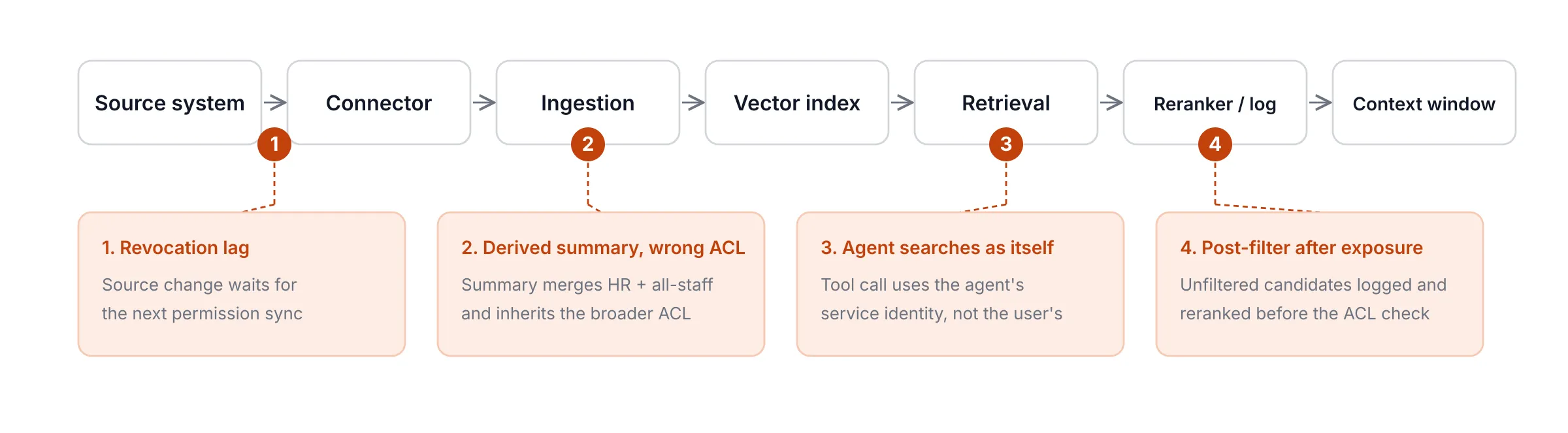
Most RAG authorization failures happen in systems that already have a filter. Unfiltered candidates reach a reranker or a log, a revocation lags behind the source system, derived content carries the wrong ACL, or an agent retrieves with its own credentials instead of the user's.
The four scenarios below are illustrative. They are composites of common failure patterns, not records from a specific deployment. Each log follows the same format, so you can read across them easily: timestamp | principal | step | doc_id | decision.
The Post-Filter That Still Leaked
A finance analyst asked an internal assistant about quarterly forecasting. The retrieval engine pulled the 20 most relevant chunks, wrote all of them to a debug log, and sent them to an external reranking service. Only after that did the access check run and remove 17 chunks the analyst wasn't allowed to see. The final answer was clean, but board-level content had already reached a log file and a third-party service.
Illustrative scenario: post-filtering after exposure
2026-10-12 14:03:11 | user:priya.finance | vector_search top_k=20 | 20 chunks      | returned
2026-10-12 14:03:11 | svc:rag-api        | debug_log.write        | doc:board-q3-fin | WRITTEN
2026-10-12 14:03:12 | svc:rag-api        | rerank (external)      | 20 chunks        | SENT
2026-10-12 14:03:12 | user:priya.finance | acl_check              | 17 chunks        | denied
2026-10-12 14:03:13 | user:priya.finance | context_build          | 3 chunks         | allowed
The Revocation That Took 26 Hours
A project lead was removed from an acquisition folder at 09:10 on Monday. The connector refreshed permissions once a day, and Monday's refresh had already processed that folder a few minutes earlier. The change didn't reach the index until Tuesday's run finished at 11:10. That left 26 hours in which the lead could still retrieve the deal memo through the assistant, even though SharePoint already showed "access denied."
Illustrative scenario: revocation lag
2026-10-19 09:10:04 | admin:it-ops        | source_acl_change        | doc:deal-memo-atlas | REVOKED
2026-10-19 15:42:37 | user:rahul.projects | retrieve                 | doc:deal-memo-atlas | ALLOWED (stale ACL)
2026-10-20 08:55:12 | user:rahul.projects | retrieve                 | doc:deal-memo-atlas | ALLOWED (stale ACL)
2026-10-20 11:10:46 | svc:connector-sp    | permission_sync_complete | doc:deal-memo-atlas | acl updated
2026-10-20 11:12:03 | user:rahul.projects | retrieve                 | doc:deal-memo-atlas | denied
The Summary That Inherited the Wrong ACL
A weekly digest job summarized recent documents into one entry so the assistant could answer "what changed this week?" questions faster. One digest combined an HR investigation note with an all-staff announcement and was tagged with the broader of the two permissions. Any employee asking about recent updates could now read a summary of a confidential investigation.
Illustrative scenario: derived content with the wrong ACL
2026-10-14 02:00:15 | svc:digest-job     | summarize_sources | doc:hr-inv-0193      | acl=hr-investigations
2026-10-14 02:00:15 | svc:digest-job     | summarize_sources | doc:allstaff-oct-14  | acl=all-staff
2026-10-14 02:00:18 | svc:digest-job     | write_digest      | doc:digest-week-41   | acl=all-staff
2026-10-15 10:21:44 | user:arjun.eng     | retrieve          | doc:digest-week-41   | ALLOWED
2026-10-15 10:21:45 | user:arjun.eng     | context_build     | includes hr-inv-0193 | DELIVERED
The Agent That Searched as Itself
A customer-support agent was given a retrieval tool so it could look up contract terms. The tool authenticated with the agent's own service identity, which could read every customer's contracts. No on-behalf-of token was passed for the customer in the chat. When one customer asked about renewal terms, the agent retrieved and quoted a clause from a different customer's contract.
Illustrative scenario: agent retrieving with its own identity
2026-10-22 16:30:02 | user:cust-0417      | chat_message       | "renewal terms?"     | received
2026-10-22 16:30:03 | svc:support-agent   | tool_call retrieve | on_behalf_of=null    | scope=all-tenants
2026-10-22 16:30:03 | svc:support-agent   | vector_search      | doc:contract-cust-22 | ALLOWED
2026-10-22 16:30:05 | user:cust-0417      | response           | cites contract-cust-22 | DELIVERED
This pattern extends well beyond RAG. We cover it in depth in our analysis of data leaking through agent tool calls and MCP.
What These Failures Have in Common
Every scenario had some form of access control, and every one leaked at a point the control didn't cover.
| Scenario | Where the control was missing | Where we fix it |
|---|---|---|
| Post-filter that leaked | Before logging and reranking | Step 4: enforce inside the query |
| 26-hour revocation | Between the source system and the index | H2 5: revocation latency budget |
| Summary with the wrong ACL | When derived content was created | Step 1: the most-restrictive ACL rule |
| Agent searching as itself | In the identity passed to the retrieval tool | Step 2: on-behalf-of identity |
There's one more thing they share. You would only find any of them if your logs recorded the authorization decision for each retrieved chunk, not just the user's question and the model's answer. Our guide to AI audit logs and forensic visibility explains how to capture that evidence.
How Do You Implement Document-Level Authorization in RAG?
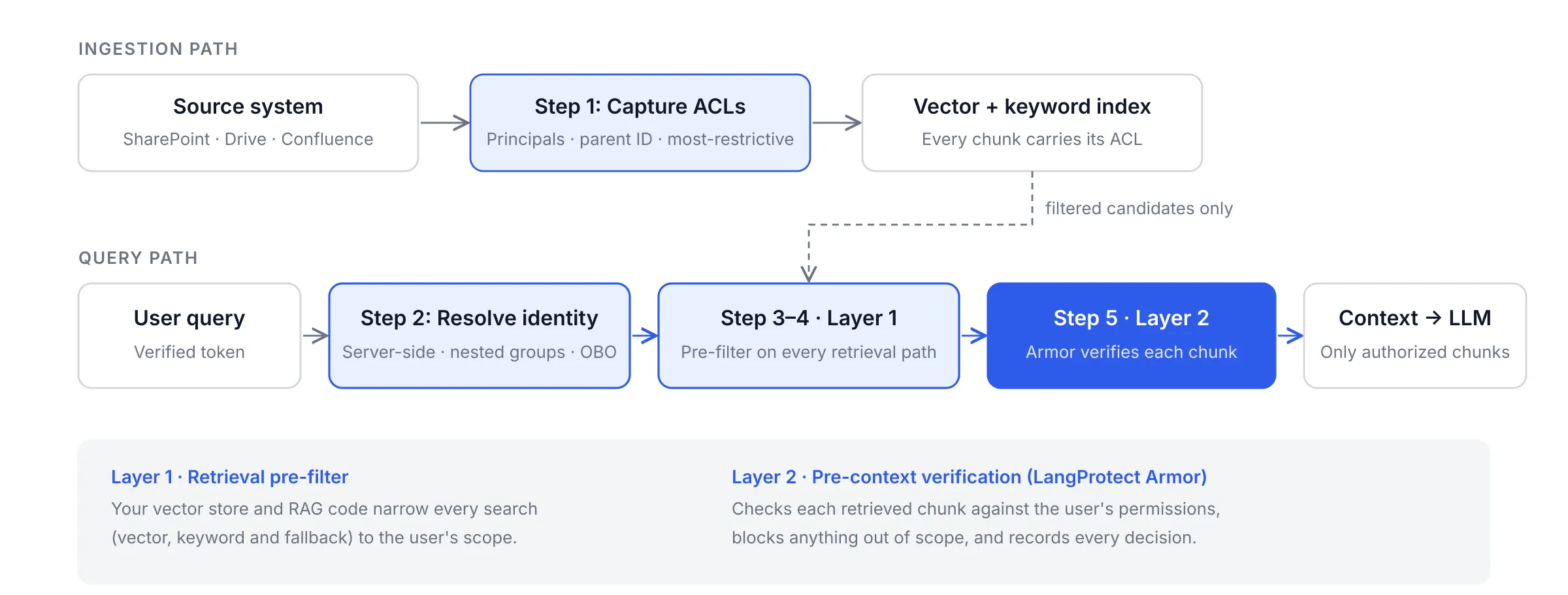
You implement document-level authorization at five points:
- Capture ACLs at ingestion.
- Resolve identity on the server.
- Choose a policy model.
- Enforce authorization inside the retrieval query.
- Verify each chunk against the user's permissions before it enters the context window.
Each step closes one of the failures from the previous section, and together they make up the authorization layer for any homegrown LLM application that answers from enterprise documents.
Step 1 — How Do You Capture Permissions at Ingestion?
You capture permissions at ingestion by copying the source document's access rules onto every chunk before it is embedded and indexed. Ingestion is the only moment the pipeline holds the document and its permissions together. Anything not captured here has to be reconstructed later, usually incorrectly.
Four rules keep the captured metadata reliable:
- Store principals, not usernames. Record the groups and roles allowed to read the document, such as group:finance-fpna, rather than a list of individual people. Group membership changes daily, and a per-user list goes stale within weeks.
- Keep a stable parent ID and source version on every chunk. When a document is deleted or re-permissioned, you can find and update every chunk derived from it without searching metadata and hoping.
- Apply the most-restrictive rule to derived content. Any summary, merged chunk or extracted fact built from several documents gets the intersection of their ACLs. A digest built from an HR file and an all-staff memo is readable only by people who can read both.
- Fail closed on missing ACLs. A chunk with null or malformed permission metadata is not indexed. It is logged as an ingestion error instead.
{
  "chunk_id": "doc-8841#c12",
  "parent_doc_id": "doc-8841",
  "source_system": "sharepoint",
  "source_version": "v37",
  "tenant_id": "acme",
  "allowed_principals": ["group:finance-fpna", "group:cfo-office"],
  "classification": "confidential",
  "derived_from": ["doc-8841"],
  "acl_synced_at": "2026-11-02T09:00:00Z"
}
Step 2 — How Do You Resolve the Caller's Identity Safely?
You resolve the caller's identity on the server, from a verified token, and never from values the client sends. If the browser or API caller can submit its own tenant_id or groups field, anyone with a developer console can widen their own access.
Group expansion needs care in Microsoft environments. Users often inherit access through nested groups, and Microsoft Entra ID stops listing groups inside a JWT once a user belongs to more than 200, issuing an overage indicator instead. Your identity service should resolve the full, nested group set server-side rather than trusting whatever groups happen to be in the token.
For agents, pass the user's identity down the call chain using an on-behalf-of token. Otherwise the retrieval tool authenticates as the agent's own service account and recreates the confused-deputy problem.
Step 3 — Should RAG Use RBAC, ABAC, or ReBAC?
The right policy model depends on how your organization actually grants access, not on which vector database you chose. Most enterprises end up combining two of the four models below.
| Model | How permission is expressed | Fits well when | Breaks down when |
|---|---|---|---|
| RBAC (role-based) | A role grants access to a class of documents | Access maps cleanly to job functions | Access varies by project or deal, causing role explosion |
| ABAC (attribute-based) | A policy evaluates attributes such as department, clearance or region | Rules depend on conditions, not just identity | Attributes go stale or policies become hard to audit |
| ReBAC (relationship-based) | Access follows relationships: owner, shared-with, member of a workspace | Shared drives, inherited folders, delegated ownership | You lack a relationship graph and a policy service to run it |
| Live source check | The source system confirms access at query time | Highly sensitive sources where staleness is unacceptable | Latency and API limits make per-query checks expensive |
One practical constraint shapes every design: the large allow-list problem. A senior user may be entitled to 400,000 documents. Passing 400,000 document IDs into a vector query isn't feasible. So filter on the principals stored on each chunk (Step 1) and match them against the user's resolved groups (Step 2).
ReBAC engines such as [OpenFGA](https://openfga.dev/) and SpiceDB, both modeled on Google's Zanzibar system, can return the set of resources a user may read. That approach works well for narrower scopes, or as a final per-candidate check.
Step 4 — How Do You Enforce Authorization Inside the Vector Query?
You enforce authorization by attaching the user's resolved scope to the retrieval query itself, so restricted chunks are never scored. Our RAG security guide explains why that ordering matters. The implementation details below are what keep it intact in production:
- Filter every retrieval path, not just the vector search. Hybrid search runs a keyword (BM25) index alongside the vector index, and many pipelines add a fallback retriever when results are thin. Each one needs the same filter, built from the same identity.
- Rerankers only ever see filtered candidates. Sending unfiltered results to a reranking model, especially an external one, is a disclosure even if the final answer is clean.
- Benchmark at your real filter selectivity. On some vector engines, a filter that excludes most of the index can reduce recall or slow search. Test with filters as strict as your real users' scopes, not with a lenient test account.
claims = verify_token(request.headers["Authorization"])   # server-side only
principals = resolve_groups(claims["oid"])                 # expands nested groups
if not principals:
    return []                                              # fail closed

results = index.query(
    vector=query_embedding,
    top_k=8,
    filter={"tenant_id": {"$eq": claims["tid"]},
            "allowed_principals": {"$in": principals}},
)
Most major platforms now offer a native way to apply this filter. Check each one's documented behavior before relying on it.
| Platform | Native mechanism | What to verify | Official docs |
|---|---|---|---|
| Azure AI Search | Document-level access using Entra identities, SharePoint ACLs and Purview labels | Permission sync lag; preview API status | Document-level access overview |
| Amazon Bedrock Knowledge Bases + Verified Permissions | Metadata pre-filters built from Cedar policy decisions | Authorizer cache TTL; logical vs physical isolation | AWS reference architecture, KB metadata filtering |
| Pinecone | Metadata filters ($eq, $in) and namespaces per tenant | Filter built only server-side | Filter by metadata |
| Qdrant | Payload filters with payload indexes | Recall under strict filters | Filtering |
| pgvector (PostgreSQL) | Row-level security policies, default deny once enabled | Owner and BYPASSRLS roles skip policies | Row security policies |
| OpenFGA / SpiceDB | Relationship-based checks and "list objects" queries | Consistency and revision semantics | OpenFGA docs, SpiceDB docs |
Step 5 — Why Verify Chunks Again Before Context Assembly?
A second, independent check before context assembly catches whatever the retrieval filter misses: a bug in the code that builds the filter, chunks with stale ACLs, or a fallback path someone forgot to filter. AWS builds its Bedrock pattern on the same principle. It uses two independent authorization layers, so a misconfiguration in one is still caught by the other.
User query
   → Identity resolved on the server (verified token, nested groups)
   → Layer 1: Retrieval pre-filter (vector + keyword + fallback paths)
   → Layer 2: Chunk verification against user permissions (LangProtect Armor)
   → Context window → LLM → Response
This is the layer LangProtect Armor provides. Armor checks each retrieved chunk against the requesting user's permissions before it reaches the model, blocks anything outside that scope, and keeps an audit-ready record of every allow and block decision. That record is what lets you prove what a user could see on a given day.
The pre-filter is still required. Armor's check protects the context window. It cannot recall a chunk that an unfiltered pipeline has already written to a debug log, cached, or sent to a reranker. Enforce Layer 1 first, and use Layer 2 to verify it.
How Fast Does a Permission Revocation Reach Your RAG System?
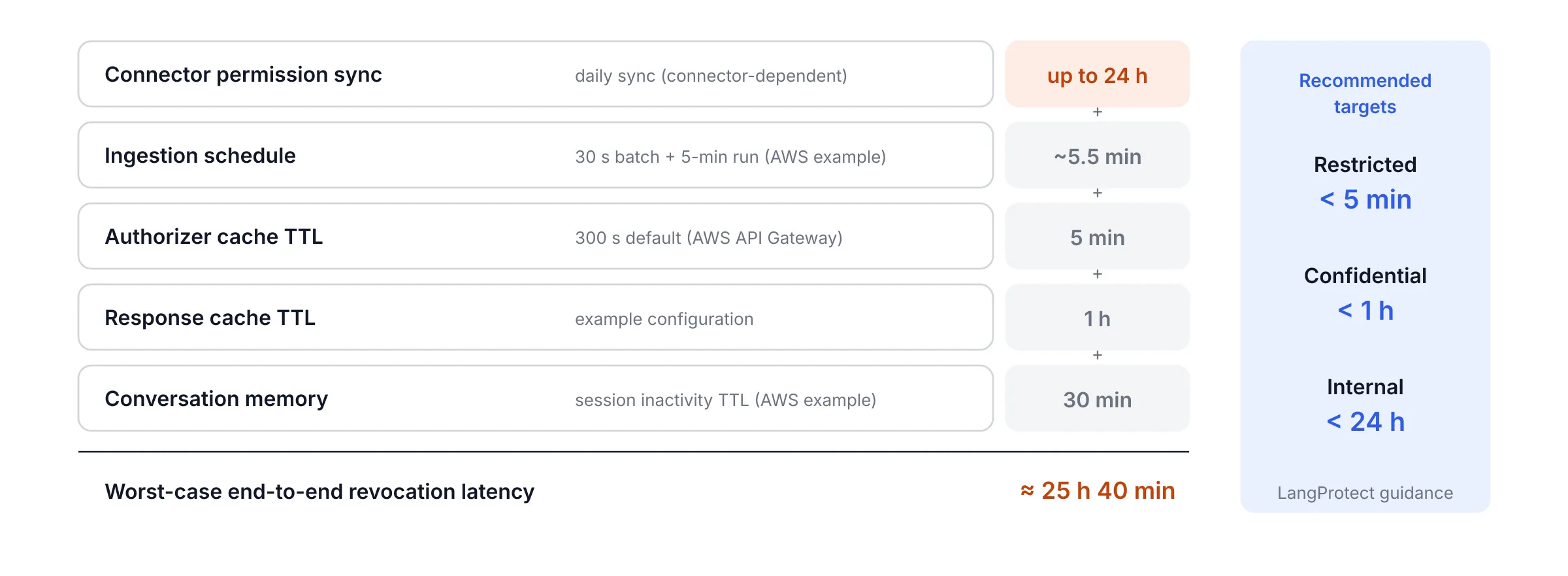
Revocation latency is the sum of every layer that holds a copy of permission state. You should measure it end to end and set a target for each data class, not for each component. When access is removed in SharePoint, Google Drive or your identity provider, the RAG system doesn't learn about it at once. The change has to travel through the connector, the ingestion pipeline, the authorization cache, the response cache and any active conversation. Each of those layers can keep serving the old permission until its own refresh cycle runs.
Teams usually tune each layer on its own and never add the delays together. The table below shows what a realistic chain looks like, using published defaults where vendors document them.
| Layer | Example default | Source |
|---|---|---|
| Connector permission sync | Minutes to 24 hours, depending on connector | Azure AI Search documentation notes a timing lag before permission changes are recognized |
| Ingestion schedule | 30-second batching plus an ingestion run every 5 minutes | AWS Bedrock reference architecture |
| Authorizer cache TTL | 300 seconds | AWS API Gateway default, per the same architecture |
| Semantic or response cache TTL | Your configuration | — |
| Conversation memory | Session lifetime, e.g. 30 minutes of inactivity | AWS example session TTL |
Add those together for a connector that syncs permissions once a day. In the worst case, a revoked user can keep receiving restricted content for more than a day, even though every layer is working exactly as configured.
What Revocation Target Should Each Data Class Have?
Your revocation target should match the sensitivity of the data, because no single target fits every document. We recommend the following targets. They are LangProtect's guidance, not an industry standard.
| Data class | Recommended end-to-end revocation target |
|---|---|
| Restricted (M&A, legal privilege, PHI, board material) | Under 5 minutes |
| Confidential (financials, HR, customer contracts) | Under 1 hour |
| Internal (policies, general documentation) | Under 24 hours |
If a connector cannot meet the target for restricted sources, add a live source-system check for those collections, as described in Step 3.
How Do You Measure Revocation Latency?
You measure revocation latency with a timed drill using two test accounts that start with identical access.
- Both accounts query a restricted test document and confirm they can retrieve it.
- Revoke access for one account in the source system and record the exact time.
- Have that account repeat the same query at fixed intervals, while the control account keeps querying normally.
- Record three timestamps: the source change, the index update, and the first denied result.
The gap between the first and third timestamps is your real revocation latency. Run the drill after every connector change, cache change or platform upgrade.
Which Retrieval Paths Bypass a Correct Vector Filter?
Semantic caches, conversation memory, keyword fallbacks, rerankers, agent tool calls and error messages can all expose content that the vector filter correctly excluded. A filter protects one query path. Production RAG systems have several, and each one needs its own control.
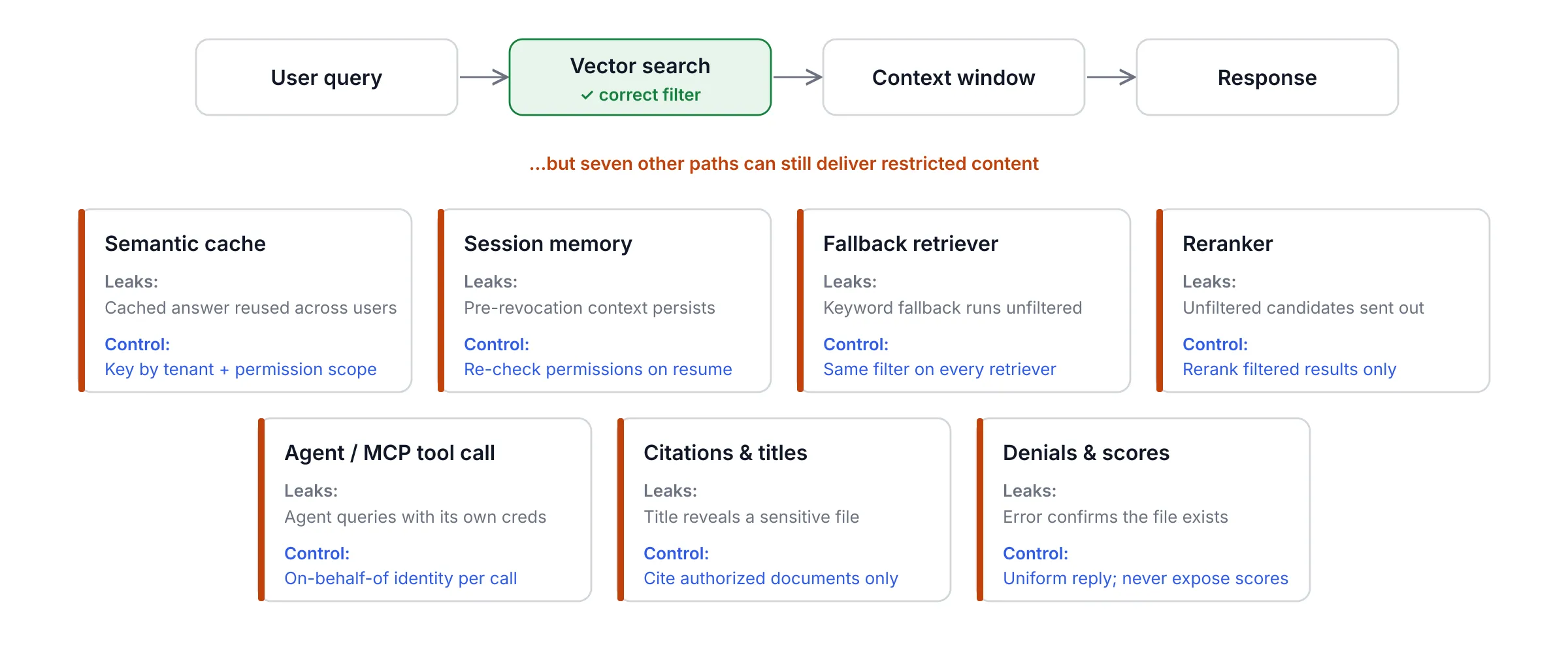
| Path | How it leaks | Required control |
|---|---|---|
| Semantic cache | A cached answer created for one user is served to another with less access | Key cache entries by tenant and permission scope; invalidate on permission change |
| Session memory | Content retrieved before a revocation stays in the conversation afterward | Re-check permissions when a session resumes; drop stale context on revocation |
| Fallback retriever | A keyword or "broaden the search" fallback runs without the filter | Apply the same identity-derived filter to every retriever |
| Reranker | Unfiltered candidates are sent to a reranking model or service | Rerank only filtered results |
| Agent and MCP tool calls | An agent re-queries the store with its own credentials | Authorize each tool call using the user's on-behalf-of identity |
| Citations and document titles | A cited title reveals that a sensitive file exists, even when its text is withheld | Return citations only for authorized documents |
| Denial messages and similarity scores | "You can't view salary_2026.xlsx" confirms the file exists; scores let attackers map the corpus | Use uniform "no information" responses; never return scores to users (OWASP RAG Cheat Sheet, Section 8) |
Why Are Caches and Memory the Easiest Bypass to Miss?
Caches and conversation memory are easy to miss because they are built and monitored as performance features, not security controls. A semantic cache returns a stored answer whenever a new question is similar enough to an old one. If its key holds only the question text, a confidential answer generated for a finance director can be served to an intern minutes later. The cache never runs retrieval again, so the filter never gets a chance to act.
The OWASP RAG Security Cheat Sheet addresses this in Section 11. Cached responses should be scoped by user, tenant and permission level. They should be invalidated when a source document or its permissions change, and highly sensitive content should not be cached at all.
Conversation memory behaves the same way. Context retrieved under yesterday's permissions remains in the session until the session ends or something explicitly clears it. Both cases can expose PII and other regulated data to the wrong person without a single new retrieval event.
How Do Agents Change the Authorization Problem?
Agents change the problem because the model, not the user, decides when to retrieve, and it can do so many times in a single task. Each tool call needs its own authorization check, separate from the model's decision to make the call. The fact that an agent chose to search a contracts index says nothing about whether the user behind it may read those contracts.
Retrieved content can also contain injected instructions that push the agent to search more widely than the user intended. That is why the authorization scope must come from the user's verified identity and never from anything the model generates.
LangProtect Vector governs these agent and MCP tool calls and tracks data labels across tool calls within a session. We explain the full pattern in our guide to stopping data leaks through agent tool calls and MCP.
Check Every Retrieved Chunk Before It Reaches the Model
LangProtect Armor verifies each retrieved chunk against the requesting user's permissions at runtime and records every decision for audit.
How Do You Red Team Document-Level Authorization?
You red team document-level authorization by asking the same questions as different personas, revoking access mid-test, taking the policy service offline, and probing caches and side channels for anything the filter missed. Repeat the full set after every connector, model or permission change. A one-time test only proves the system was safe on the day you tested it.
Red teaming authorization is narrower than general LLM red teaming. You aren't trying to make the model say something harmful. You are trying to make the system hand a user content their identity was never entitled to see. If you're new to the discipline, our enterprise guide to LLM and AI red teaming covers the fundamentals.
What Changed in AI Red Teaming in 2026?
In 2026, AI red teaming moved from occasional engagements to continuous, evidence-based testing. At the same time, platform vendors and standards bodies began defining how controls should be enforced at runtime.
| Date | Change | Why it matters for RAG authorization |
|---|---|---|
| Mar 23, 2026 | NIST CAISI, Gray Swan and UK AISI published results from a public competition: 464 participants made 272,000 attack attempts, and every one of the 13 frontier models was successfully attacked at least once | No model is a security boundary. Controls have to live outside the model. |
| 2026 | LeakDojo (ACL Findings) benchmarked six RAG leakage attacks across 14 LLMs and found that stronger instruction-following correlated with higher leakage | Better models can leak more retrieved content, not less. |
| May–Aug 2026 | Azure AI Search preview APIs added native document-level access, with documented permission-sync lag | Vendors now treat retrieval authorization as a core feature, and acknowledge its timing gaps. |
| Jun 22, 2026 | AWS published its Bedrock + Verified Permissions pattern with two independent authorization layers | Defense in depth for retrieval is now a published cloud-provider reference. |
| Aug 3, 2026 | OWASP published the LLM Top 10 2026, renumbering several entries | Cite risk IDs with their year (for example LLM08:2025) so audit mappings stay accurate. |
| Sep 1–2, 2026 | OWASP unveiled the Agent Control Standard as a v0.1 preview for runtime enforcement | Standards are shifting from listing risks to defining runtime control points. |
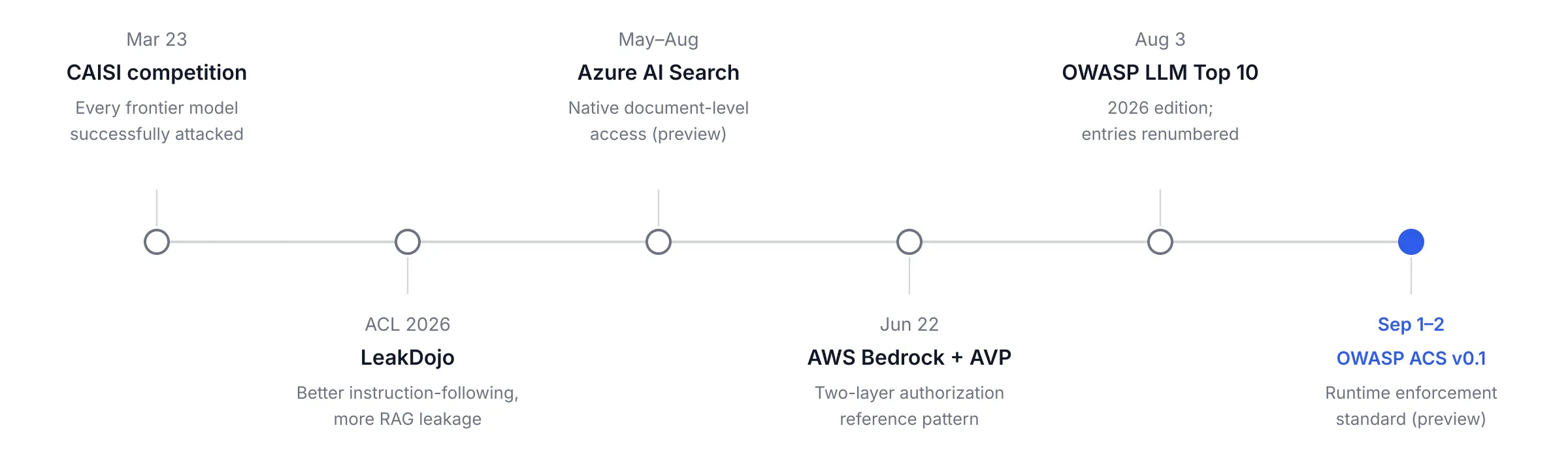
The pattern across all six changes is the same. The industry now expects evidence that controls hold under attack, not a single passing test at launch.
What Should an Authorization Red-Team Matrix Include?
An authorization red-team matrix pairs each persona with a scenario and states the expected result in advance, so a pass or fail is never a matter of opinion. The OWASP RAG Security Cheat Sheet recommends building tests such as cross-tenant retrieval, stale permissions and cache leakage into CI/CD. The matrix below includes those tests plus the failure patterns from this post.
| # | Persona | Scenario | Expected result |
|---|---|---|---|
| 1 | Finance analyst | Asks a question whose best answer sits in a board-only document | No board chunk reaches the context window, logs or reranker |
| 2 | Tenant A user | Asks a question with a near-identical document in Tenant B | Only Tenant A content is returned |
| 3 | Project lead | Access revoked mid-session, then repeats the same question | Denied within the data class's revocation target |
| 4 | All-staff employee | Asks about "this week's updates" when a digest merged an HR file | The digest is not retrievable by this user |
| 5 | API caller | Sends a forged tenant_id or groups field in the request | Request denied, or the server-derived identity is used |
| 6 | Any user | Queries while the policy service is offline | Retrieval fails closed and returns nothing |
| 7 | Intern | Asks a question previously answered for a director | Cache miss; no cross-principal cache hit |
| 8 | Customer via support agent | Asks a question that triggers an agent tool call | Tool call carries the customer's on-behalf-of identity |
| 9 | Any user | Probes for a known restricted file by name | Uniform "no information" response; no title, score or existence leak |
| 10 | Any user | Queries a document deleted from the source system | No chunks returned after the deletion propagates |
How Does LangProtect's AI Red Team Test This?
LangProtect's AI Red Team tests document-level authorization through a combination of manual testing and automated testing with LangProtect-trained attack agents. Engagements follow a Discover → Remediate → Shield loop. Discovery runs the persona and scenario matrix against your real retrieval pipeline. Remediation maps each finding to the enforcement point that failed. Shield turns confirmed findings into Armor runtime policy, so the fix is enforced on every request rather than left as a recommendation. We explain that handoff in detail in our guide to turning red team findings into runtime policy.
Expert Insight
"An authorization test you ran at launch tells you what your RAG system did on launch day. Every new connector, group change, or model swap rewrites that answer, so the test has to run as often as the permissions change."
— Saurabh Upadhyay, AI Engineer, LangProtect
Red Team Your RAG Authorization Before an Auditor Does
LangProtect's AI Red Team runs persona-based authorization tests against your live retrieval pipeline and turns every finding into enforced policy.
What Does a Production Rollout of RAG Authorization Look Like?
A production rollout of RAG authorization runs in four phases: audit current exposure, close ingestion and identity gaps, enforce and measure revocation, then make authorization red teaming continuous. Each phase has a named owner and an exit criterion, so progress can be reported to leadership rather than assumed. RAG authorization also spans three teams that rarely share a backlog: security, platform engineering and the owners of the source data. Name an owner for each phase before work starts.
The 30/60/90-Day Plan
| Phase | Actions | Owner | Exit criterion |
|---|---|---|---|
| Days 0–30: Audit exposure | Inventory every connector and its read scope; run the red-team matrix against the current system; record baseline revocation latency | Security, with platform engineering | Documented list of every source, its connector permission, and every failed test |
| Days 31–60: Close ingestion and identity gaps | Add principal ACLs, parent IDs and source versions to every chunk; apply the most-restrictive rule to derived content; resolve identity server-side; pass on-behalf-of tokens for agents | Platform engineering, with data owners | No chunk in the index without an ACL; no client-supplied scope accepted |
| Days 61–90: Enforce and measure | Pre-filter every retrieval path; enable chunk verification before context assembly; scope caches by permission; meet revocation targets per data class | Platform engineering, with security | Revocation drill passes every class target; every allow and block decision is logged |
| Ongoing: Continuous red teaming | Run the matrix in CI and after every connector, model or permission change; review findings quarterly with data owners | Security | Zero open critical authorization findings; evidence retained for audit |
These phases slot into a broader enterprise AI governance program, where the same owners already report on other AI controls.
The Document-Level Authorization Readiness Checklist
This checklist covers authorization specifically. It complements the broader RAG security checklist in our pillar guide rather than repeating it.
| Control | How to verify | Failure if missing |
|---|---|---|
| Every chunk carries principal ACLs and a parent document ID | Query the index for chunks with null ACL or parent fields | Unlabeled chunks become readable by everyone |
| Derived content uses the most-restrictive ACL | Inspect the ACLs of summaries and merged chunks against their sources | Summaries expose restricted documents to broad groups |
| Identity is resolved server-side with nested groups | Send a request with a forged groups field | Any caller can widen their own access |
| Agents retrieve with on-behalf-of identity | Trace a tool call and check which identity it used | Agents retrieve with tenant-wide service credentials |
| Every retrieval path is pre-filtered | Test vector, keyword and fallback retrievers separately | Unfiltered fallback results reach the model |
| Rerankers see only filtered candidates | Inspect the payload sent to the reranker | Restricted content reaches internal or external rerankers |
| Chunks are verified before context assembly | Inject a chunk with a stale ACL and confirm it is blocked | Filter bugs pass straight into the context window |
| Caches are scoped by tenant and permission | Run the same query as two users with different access | Cached answers cross permission boundaries |
| Revocation meets each data-class target | Run the two-account revocation drill | Revoked users keep access for hours or days |
| Every authorization decision is logged | Reconstruct one user's retrievals from a past date | No evidence for auditors or incident response |
The last row is what turns every other control into evidence. Our guide to AI audit logs and forensic visibility covers which fields to capture and how long to keep them.
How Does LangProtect Help You Implement and Prove RAG Authorization?
LangProtect adds the verification and evidence layers to RAG authorization. Armor checks retrieved chunks against each user's permissions before they reach the model. The AI Red Team proves those controls hold under attack, and Vector governs the retrieval paths that agents open through tool calls. Each product maps to a specific step in the framework above, so you can adopt the one that closes your biggest gap first.
| Framework step | Where it can fail | LangProtect component |
|---|---|---|
| Step 5: Verify chunks before context assembly | Filter bugs, stale ACLs, unfiltered fallback paths | Armor |
| H2 6: Bypass paths through agents and MCP | Agents retrieving with their own credentials | Vector |
| H2 7: Continuous authorization testing | Controls that pass at launch and decay afterward | AI Red Team |
| H2 8: Evidence for every decision | No record of what a user could see on a past date | Armor decision records |
Armor — Runtime Authorization for Retrieved Context
LangProtect Armor sits inline between your retrieval layer and the model, and evaluates every request at runtime:
- Checks each retrieved chunk against the requesting user's permissions before it enters the context window, and blocks unauthorized data access.
- Scans retrieved context and model output with built-in scanners for Sensitive/PII data, Secrets and Prompt Injection. A document the user may read can still carry hidden instructions or a leaked credential.
- Keeps audit-ready decision records of every allow, restrict and block decision, so you can reconstruct exactly what reached the model for any user on any date.
- Detects risk in under 200 ms, so verification doesn't become the bottleneck in a user-facing assistant.
AI Red Team — Continuous Proof
The LangProtect AI Red Team runs the persona-based authorization matrix against your live pipeline. It combines manual testing with automated testing by LangProtect-trained attack agents. Engagements follow the Discover → Remediate → Shield loop, and confirmed findings become Armor runtime policy instead of a report that waits in a backlog.
Vector — Agent and MCP Retrieval Paths
LangProtect Vector governs the tool calls that agents and MCP servers make on a user's behalf. It tracks data labels across tool calls within a session, so content retrieved under one permission scope can't quietly travel into a later call or response that the user isn't entitled to.
What LangProtect Does Not Replace
LangProtect doesn't replace your identity provider or your vector store's pre-filter. Your identity provider still owns who the user is and which groups they belong to. Your ingestion pipeline and vector store still own capturing ACLs and filtering the search. LangProtect's role is to verify that those controls held on every request, enforce policy where they didn't, and keep the evidence.
A Founder’s Take
"Teams rarely lose RAG data because nobody configured permissions. They lose it in the gaps between layers: the cache that outlived a revocation, the summary that forgot where it came from. The last check before the model reads anything has to ask one question — may this user see this chunk — and keep the receipt."
— Suny, Founder, LangProtect
Every component above is included in the LangProtect free trial. You can run Armor against your own retrieval pipeline and see which chunks it would allow or block for each user.
Frequently Asked Questions
What is document-level authorization in RAG?
Document-level authorization in RAG is a control that checks whether the requesting user may read each source document before any of its chunks are retrieved or passed to the language model. Chunks inherit the permissions of their parent document, and the check uses the caller's server-verified identity rather than anything the client submits.
Is post-filtering ever acceptable in RAG?
Post-filtering is acceptable only as a second layer behind a retrieval pre-filter. Used alone, it lets unauthorized chunks reach logs, rerankers or caches before they are removed, and it can starve results when most candidates are dropped.
Do vector databases support document-level access control natively?
Several platforms support it to different degrees. Azure AI Search offers document-level access tied to Microsoft Entra identities, Amazon Bedrock Knowledge Bases supports metadata filters, Pinecone and Qdrant support filtered queries and tenant partitions, and pgvector can rely on PostgreSQL row-level security. Teams should verify each platform's documented behavior and sync timing before relying on it.
What should happen to chunks with missing permission metadata?
Chunks with missing or malformed permission metadata should be excluded from retrieval. A fail-closed default costs some recall temporarily, while treating unlabeled content as public can expose restricted documents to every user.
How quickly should permission revocations reach a RAG system?
Revocation speed should be set per data class and measured end to end across connector sync, ingestion, authorization caches, response caches and session memory. LangProtect recommends under five minutes for restricted data, under one hour for confidential data and under 24 hours for internal data.
How do you make semantic caching safe in a multi-user RAG system?
A safe semantic cache keys every entry by tenant and permission scope, so a response generated for one user can never be served to someone with different access. Cache entries must also be invalidated when the source document or the user's permissions change.
Does document-level authorization stop prompt injection?
Document-level authorization does not stop prompt injection, but it limits what an injected instruction can reach. Retrieved content still needs injection scanning, because a malicious document the user is allowed to read can still try to manipulate the model.
How do you test whether RAG authorization actually works?
RAG authorization is tested by running identical queries as users with different permissions and confirming that no unauthorized chunk reaches the model. Strong tests also revoke access mid-session, take the policy service offline, check caches and fallback retrievers, and repeat after every connector, model or permission change.
Authorization You Can Prove, Not Just Configure
Document-level authorization in RAG is not a single filter. It is a chain of controls that starts at ingestion, runs through identity and retrieval, and ends with a final check before anything enters the context window. Most leaks happen at the joins between those layers: a cache that outlived a revocation, a summary that dropped its source ACL, an agent that searched with its own credentials.
Closing those gaps means capturing permissions on every chunk, enforcing them on every retrieval path, measuring how long revocations take to arrive, and testing the whole chain as often as permissions change.
Auditors, regulators and your own board will increasingly ask a harder question than whether you configured access control. They will ask you to show what a specific user could retrieve on a specific day. The teams that can answer with evidence, not configuration screenshots, will be the ones trusted to put AI on their most sensitive data.
Book a RAG Authorization Assessment
See what your RAG assistant can retrieve for each user, where authorization breaks down, and how to close the gaps before an audit finds them.
Tags
Related articles
How to Stop Employees from Pasting Sensitive Data into ChatGPT
RAG Security Guide: How to Prevent Data Leakage in Retrieval-Augmented Generation Systems