

How to Stop Employees from Pasting Sensitive Data into ChatGPT

The question we hear most often from security leaders is no longer whether their employees use ChatGPT. It is how to let them keep using it without company data leaving with every prompt. That is the problem LangProtect Guardia was built to solve. Across the more than 100,000 prompts Guardia has detected in employee AI usage, the pattern has been remarkably consistent: the data that leaks is rarely stolen. It is pasted, by capable, well-meaning people trying to finish their work faster.
Independent research reaches the same conclusion. The LayerX Enterprise AI and SaaS Data Security Report 2025 found that 77% of employees paste data into generative AI tools, and that 82% of that activity happens through personal accounts outside corporate visibility. Most organisations still rely on controls built for files and email, from outright bans to traditional data loss prevention, rather than for a sentence typed into a chat box. That is why so many of them miss this channel entirely.
If you need to stop employees from pasting sensitive data into ChatGPT without slowing them down, this guide combines what we observe in Guardia deployments with published guidance from OpenAI, OWASP and India's DPDP framework. It covers why it happens, what actually stops it, and how to prove your controls work.
Find out what your employees are sharing with AI
Run LangProtect Guardia on your own team for 14 days, with 20 user seats and no credit card required. See which prompts would be flagged before any sensitive data leaves the browser.
Why do employees paste sensitive data into ChatGPT in the first place?
Employees paste sensitive data into ChatGPT because it makes their work faster, not because they intend to leak it. Summarising a report, drafting a client email or fixing a piece of code all produce better answers when the AI has real context, and in the middle of a busy day, pasting that context feels like a harmless shortcut.
That is what makes this risk so different from a traditional breach. There is no attacker and no malicious intent, just a capable employee choosing the fastest route to a good result. Most people know their company has rules about confidential data. Under deadline pressure, though, the rule loses to the task in front of them. The bigger gap is that the AI tool gives no signal the data was sensitive in the first place.
The scale reflects how ordinary this behaviour has become. KPMG's 2025 global study on trust in AI, conducted with the University of Melbourne, found that almost half of employees admit to uploading sensitive company information such as financial, sales or customer data to public AI tools. For a closer look at what that exposure costs a business, see our analysis of how employee AI usage is already leaking company data.
Four everyday ways sensitive data ends up in ChatGPT
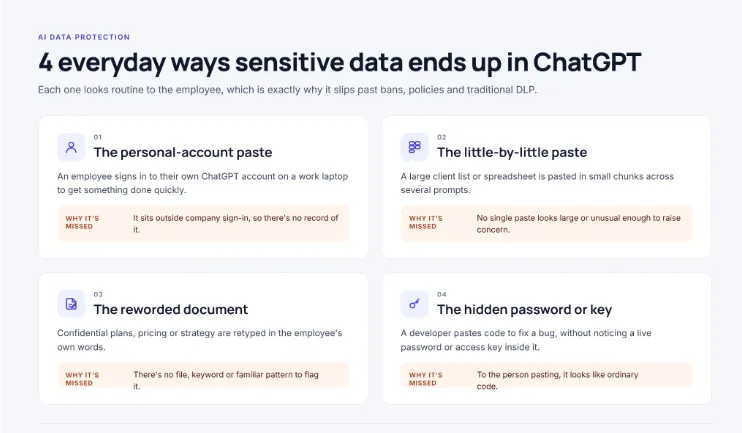
In our experience, most incidents follow one of four patterns. Each one looks routine to the employee, which is exactly why it is easy to miss.
| Scenario | What happens | Why it's easy to miss |
|---|---|---|
| The personal-account paste | An employee signs in to their own ChatGPT account on a work laptop to get something done quickly. | The activity sits outside company sign-in, so security teams have no record of it. |
| The little-by-little paste | A large client list or spreadsheet is pasted in small chunks across several prompts. | No single paste looks large or unusual enough to raise concern. |
| The reworded document | Confidential plans, pricing or strategy are retyped in the employee's own words. | There is no file, keyword or familiar pattern that signals the content is sensitive. |
| The hidden password or key | A developer pastes code to fix a bug, without noticing a live password or access key inside it. | To the person pasting, it looks like ordinary code rather than a credential. |
Each pattern needs a different kind of protection. That is why the obvious fixes, which tend to address only one of them, fall short.
How do you stop employees from pasting sensitive data into ChatGPT?
You stop employees from pasting sensitive data into ChatGPT by checking every prompt and file before it leaves the browser. Sensitive details are redacted or blocked automatically, safe prompts go straight through, and every risky attempt is recorded. Banning ChatGPT or relying on policy alone fails, because neither acts at the moment someone hits paste.
The goal is not to stop people using AI. It is to make sure the data they share stays within the boundaries your organisation has set, without turning every prompt into an approval process. OWASP lists sensitive information disclosure among the top risks for AI applications for exactly this reason: once private data reaches a model, you no longer control where it is stored, who can review it, or how long it is kept.
Why the moment of the paste matters most
Almost every data leak through ChatGPT happens in a few seconds. An employee copies something, pastes it, and presses Enter. Anything that acts after that point, whether it is a quarterly audit, a log review or an incident investigation, can only tell you what has already left. Protection has to work at that single moment, and it has to be fast enough that employees barely notice it.
The three things effective protection must do
In practice, effective protection comes down to three capabilities working together:
- See it. Know which AI tools your employees actually use, including personal accounts and tools nobody has approved. Most organisations underestimate this number. You cannot protect usage you cannot see, which is what shadow AI detection is built for.
- Check it. prompt filtering before the moment it is sent, can prevent sensitive details from reaching ChatGPT rather than being discovered weeks later. The check should respond in proportion to the risk:
- remove the sensitive detail and let the prompt through;
- warn the employee when something looks borderline;
- block only what must never leave.
- Record it. Keep a clear trail of what was flagged, redacted or blocked, by whom and in which tool. That record is what lets security and compliance teams show auditors and customers that their safeguards actually work. See why AI audit logs matter for forensic visibility.
Most organisations already have one of these pieces in place. Very few have all three, and the gap between them is where pasted data slips through.
The three ways organisations respond, compared
| Approach | What actually happens | Result |
|---|---|---|
| Ban ChatGPT | Usage moves to personal phones, home laptops and personal accounts, which is why banning ChatGPT creates more shadow AI risk. | Less visibility, same risk. |
| Policy and training only | Rules exist, but nothing enforces them when an employee is rushing to finish a task. | Protection depends on memory under pressure. |
| Check before it's sent | Each prompt and file is reviewed in real time, and sensitive details are redacted, warned on or blocked. | Protection that doesn't slow work down. |
The first two approaches are where most organisations start, and both feel reasonable on paper. The next section explains why they, along with traditional DLP tools and even ChatGPT Enterprise, keep falling short in practice.
Why don't bans, policies and old DLP tools stop it?
Bans, policies and traditional DLP tools fail because none of them works at the point where the risk happens: the moment text is pasted into a chat box. Bans push usage out of sight, policies depend on people remembering them under pressure, and older DLP tools were built to watch files and email, not conversations with an AI.
Each of these controls was a sensible answer to an earlier problem. The issue is that pasted text behaves differently from the files, attachments and downloads they were designed around.
Banning ChatGPT drives usage underground
Blocking ChatGPT on the company network feels decisive, but it rarely removes the behaviour. It moves it somewhere you can't see.
- Employees switch to personal phones, home laptops or mobile data, where company controls don't reach.
- Work continues through personal accounts, leaving no company record of what was shared.
- New AI tools appear constantly, so any blocklist is always behind.
- The productivity benefit you wanted from AI disappears, while the risk stays.
Instead of blocking, the stronger approach is to bring personal and unmanaged usage into view and under policy. That is the focus of GenAI chatbot governance.
Policies and training don't act in the moment
A clear AI acceptable use policy is essential. It tells people which tools are approved and which data must never be shared, and it gives you a basis for accountability. But a policy is guidance, not protection.
- It relies on employees recognising sensitive data in the middle of a busy task.
- It cannot stop a paste that happens in seconds.
- It gives you no way to know whether it is being followed.
Training helps people understand the risk. It doesn't change the fact that the fastest route to finishing a task often runs through a chat box.
Traditional DLP can't see text in a chat box
Data loss prevention tools were designed to watch for sensitive files leaving the organisation: email attachments, uploads to personal cloud storage, copies to USB drives. A paste into ChatGPT doesn't look like any of those.
- There's no file. The data travels as ordinary text typed into a web page.
- The destination looks normal. To the network, it is simply a visit to a well-known, often permitted, website.
- Rules only catch what they expect. Even tools that check pasted text usually rely on fixed patterns, such as card numbers or ID formats. Reworded strategy documents, contract terms or client notes don't match any rule. We explain why in keyword vs. pattern vs. intent scanners.
ChatGPT Enterprise protects the account, not the content
Moving employees onto ChatGPT Enterprise or a business plan is a genuinely good step. OpenAI's enterprise privacy commitments say business data isn't used to train its models by default, and administrators control how long conversations are kept. But these protections govern what happens after data arrives, not what employees choose to paste.
- An employee can still paste a client list, a password or a confidential plan into the approved account.
- OpenAI's own guidance on ChatGPT privacy advises users not to share sensitive information they wouldn't want used or reviewed.
- The approved account doesn't stop an employee opening a personal account in the next browser tab.
Risks can sit around the account too. In January 2026, researchers found two Chrome extensions, with over 900,000 combined users, copying users' ChatGPT conversations to outside servers.
What each approach misses
Mapped against the four everyday scenarios from earlier, the gaps become clear:
| Approach | Personal-account paste | Little-by-little paste | Reworded document | Hidden password or key |
|---|---|---|---|---|
| Ban ChatGPT | Misses | Misses | Misses | Misses |
| Policy and training | Misses | Misses | Misses | Misses |
| Traditional DLP | Misses | Partly | Misses | Partly |
| ChatGPT Enterprise | Partly | Misses | Misses | Misses |
How does LangProtect Guardia stop employees from pasting sensitive data into ChatGPT?
LangProtect Guardia checks every prompt in the employee's browser or desktop AI tool before it is sent. When it finds sensitive data, it applies your policy: it monitors, warns, blocks, or uses Smart Redact to swap the sensitive values for placeholders so the employee can keep working. Every decision is logged for your security and compliance teams.
What is LangProtect Guardia?
LangProtect Guardia is LangProtect's protection for how employees use AI. It runs in two places:
- A browser extension that covers ChatGPT, Claude, Gemini and Copilot on the web.
- A desktop app for Windows and macOS that covers AI coding tools such as Claude Code and Cursor. These are where developers are most likely to paste code with a password or access key in it.
Guardia recognizes more than 5,200 AI tools. It also recognizes which plan an employee is on: Free, Pro, or Business/Enterprise. That matters because the same ChatGPT prompt carries very different risk on a company Enterprise workspace than on a personal free account.
What happens when an employee pastes sensitive data into ChatGPT?
Guardia scans the prompt and any attached file before sending. If it finds sensitive data, it takes the action your policy sets for that employee, team or AI tool. You choose one of four outcomes for each policy:
| Outcome | What the employee experiences | What reaches ChatGPT | Best used for |
|---|---|---|---|
| Monitor | Nothing changes | The original prompt | Learning how teams really use AI before you enforce anything |
| Warn | A popup shows what was detected, and the employee can cancel or send anyway | Whatever the employee chooses; both choices are recorded | Lower-risk data, and teaching employees as they work |
| Smart Redact | The prompt goes through with the sensitive values replaced | A cleaned prompt with placeholders instead of real values | Everyday work involving customer or employee details |
| Block | The prompt is stopped, with no option to bypass | Nothing | Passwords, access keys, and regulated data on unapproved tools |
Policies can be as targeted as you need. For example, you might block health data on free AI plans while only warning on your approved ChatGPT Enterprise workspace. Or you might apply stricter rules to Finance and HR than to Marketing. Our guide to choosing between redact, warn and block shows how teams usually roll these out.
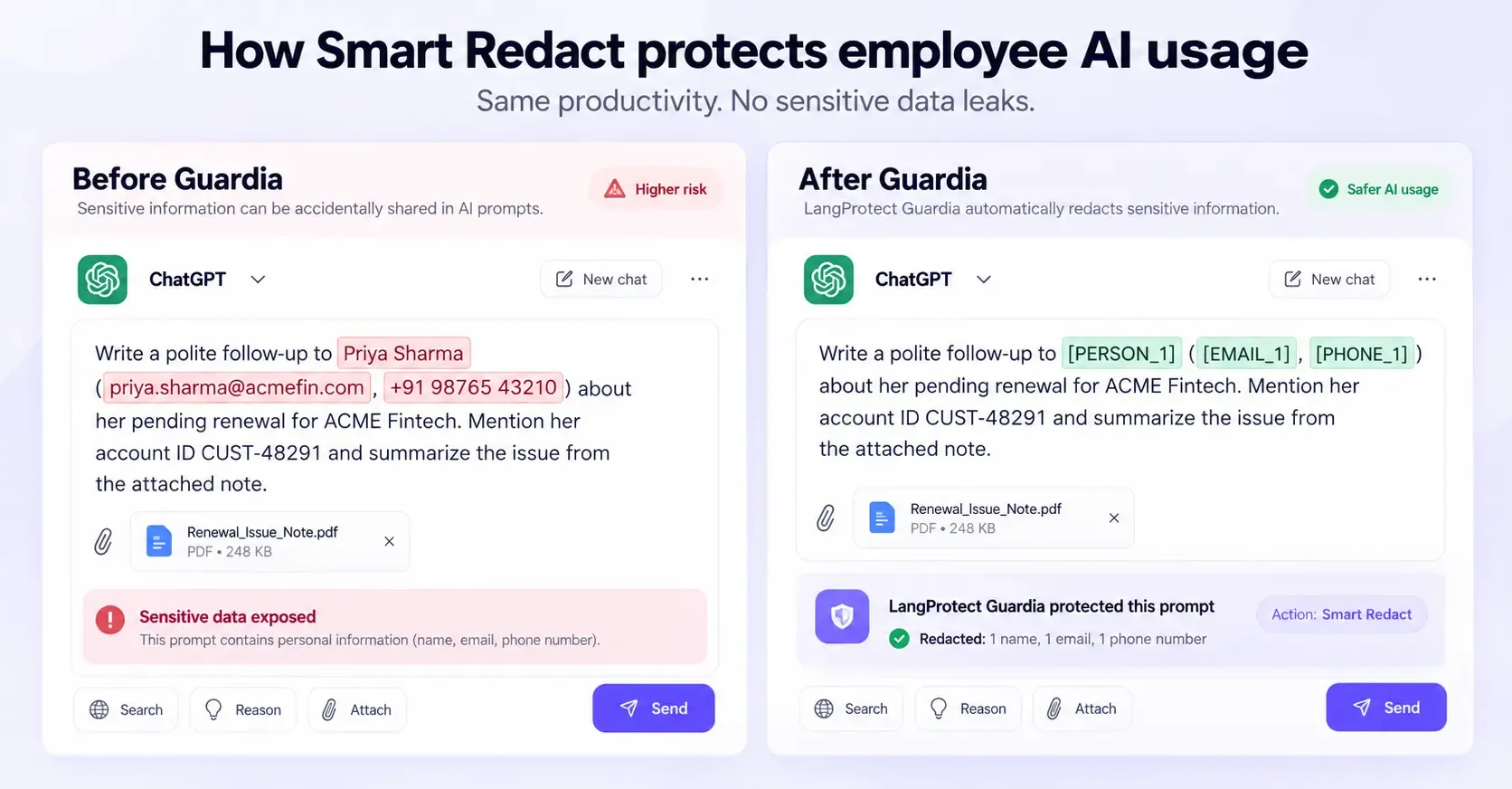
How does Smart Redact protect data without stopping the work?
Smart Redact removes the sensitive details and leaves the rest of the request intact. Guardia replaces each detected value with a typed placeholder, so ChatGPT can still understand and answer the request without ever seeing the real data.
Here is what that looks like for a sales manager drafting a follow-up email:
What the employee pastes
"Write a polite follow-up to JohnDoe (john.doe@Company.com, +91 98765 43210) about her pending renewal."
What ChatGPT receives
 "Write a polite follow-up to [PERSON_1] ([EMAIL_1], [PHONE_1]) about her pending renewal."
The employee still gets a usable draft, and the customer's name, email and phone number never reach ChatGPT. The log records exactly which details were removed, which gives your compliance team evidence that the data was protected.
Blocking teaches employees that AI is off-limits, and that pushes them toward personal devices. Smart Redact lets them keep the productivity gain while the data stays inside the company. If you're deciding between approaches, we compare sanitization, redaction and Smart Redact side by side.
What does Guardia look for in a prompt?
Guardia comes with built-in checks for the data that causes the most damage when it leaks:
- Personal information: names, emails, phone numbers, ID numbers
- Health information: patient details and medical records
- Financial information: card numbers, bank details, account data
- Passwords and access keys: credentials and secrets hidden in code or config
- Source code: proprietary code pasted for debugging
- Prompt attacks: attempts to manipulate the AI tool itself
You can also write your own rules in three ways:
- Pattern: a fixed format, such as your internal customer ID.
- Keyword: a word list, such as project codenames.
- Intent: a plain-language description, such as "unreleased pricing or acquisition plans".
Intent rules are what catch a confidential plan that an employee has retyped in their own words. We explain how the three rule types differ in keyword vs. pattern vs. intent scanners. For the built-in detection, see how Guardia detects personal, health and credential data.
How does Guardia handle the four everyday paste scenarios?
Each scenario in the infographic above slips past traditional tools for a different reason, so each needs a different kind of protection:
| Scenario | Why traditional tools miss it | How Guardia handles it |
|---|---|---|
| The personal-account paste | No company sign-in, so no record | Guardia recognizes the plan tier, so prompts on personal or free accounts are seen and can get stricter rules, as long as the device has Guardia installed |
| The little-by-little paste | No single paste looks large | Every prompt is checked on its own, and the employee's activity timeline shows the pattern building up over time |
| The reworded document | No file, keyword or familiar pattern | Intent rules flag the meaning, not just exact words |
| The hidden password or key | It looks like ordinary code | Built-in credential checks run in the browser and in desktop coding tools like Claude Code and Cursor |
Guardia also finds AI tools you haven't approved. When employees visit a site that looks like an AI app, it shows up in a "Shadow discovered" list, so you can approve or disapprove it. That's the gap a ChatGPT ban creates and never closes. Our shadow AI detection page covers this in more depth.
How does your security team see, and prove, what happened?
Each event is recorded once, with who, which team, which AI tool and plan, what was detected, how severe it was, and what action was taken. That one record feeds everything else:
- Alerts: violations sorted by severity (Critical, High, Medium, Low), with critical events sent to Microsoft Teams or email.
- Logs: a complete record of every AI interaction, including safe ones, so you can show normal usage as well as incidents.
- Violations: a heatmap and timeline of where sensitive data exposure is concentrated, by team and by tool.
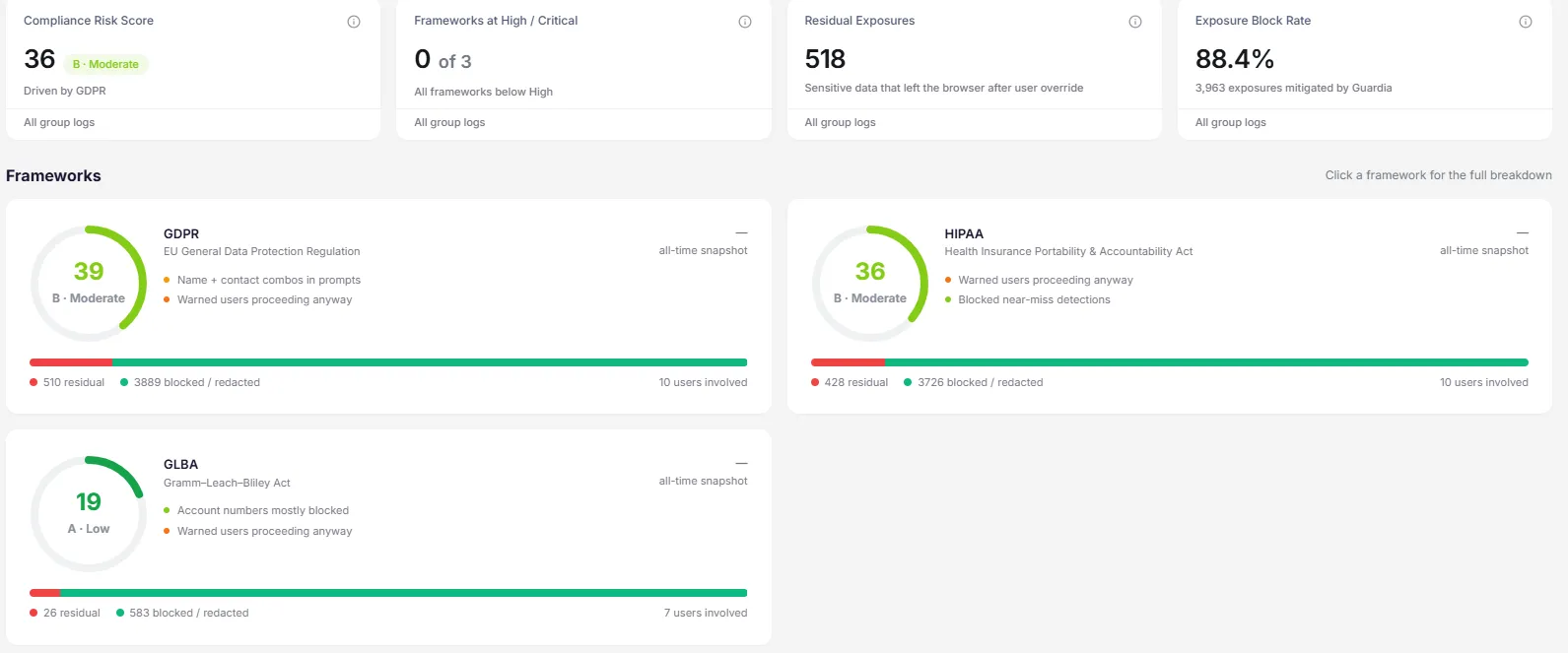
- Compliance: exposure measured against the frameworks you enable (GDPR, HIPAA, CCPA/CPRA, PCI DSS, GLBA and SOC 2), with a summary report you can download as a PDF.
A typical alert looks like this:
Risk:      High
Employee:  Sales Manager · Sales team
Tool:      ChatGPT (Free)
Detected:  Person name, email address, phone number
Category:  Sensitive Data Exposure
Action:    Redacted
Two numbers matter most for leadership:
- Mitigated: sensitive data that Guardia blocked or redacted.
- Residual exposure: data that left after an employee overrode a warning.
Together they give you an honest Exposure Block Rate. You can see exactly how much risk your controls stop and how much is getting through. A slide saying the AI policy was signed doesn't tell you that.
Access to prompt text is restricted by role. Analysts can investigate. Team managers see only their own team's data. Viewing full prompt text requires explicit permission from an admin. For more on why this level of record matters in an audit, see our guide to AI audit logs and forensic visibility.
Where does Guardia fit, and where doesn't it?
Guardia protects how your employees use AI tools, on the devices where it's installed. Being clear about its limits helps you plan the rest of your controls:
- It covers managed devices. Guardia sees what happens in browsers and desktop apps where it is installed. A personal phone with no Guardia on it is outside its view, so pair it with device and access policies.
- It measures compliance; it doesn't certify it. The compliance scores show your AI data exposure against each framework. They are not an audit or a certification.
- It doesn't protect AI apps you build yourself. Your own chatbots and LLM features need application-level protection. That's what LangProtect Armor is for.
- It works best alongside your AI policy. Guardia enforces the rules in your AI acceptable use policy at the moment they matter, which a document alone can't do.
Want to see what your employees are pasting into AI tools?
We’ll walk you through Guardia on your own use cases and show how Smart Redact protects sensitive data without slowing your teams down.
How do you know your protection actually works?
You know your protection works when you've tested it with realistic, fake sensitive data and every attempt was stopped or redacted. Each attempt should also show up in your logs with who did it, which tool they used, what was detected and what happened. If you can't show both results, you have a policy and a tool installed, not proof.
This is the question auditors, boards and customers increasingly ask. They don't stop at "do you have an AI policy?" They ask "show me it working." A rollout announcement doesn't answer that. A test does.
Why isn't installing a tool enough?
Installing a tool tells you it's running. It doesn't tell you it catches the ways your employees actually paste data. Gaps usually show up in four places:
- Coverage gaps: the tool covers ChatGPT in Chrome but not the desktop coding tool your developers use every day.
- Policy gaps: a rule is set to "Monitor" when everyone assumed it was "Block".
- Detection gaps: an exact customer ID gets caught, but a confidential plan retyped in plain English doesn't.
- Evidence gaps: the data was stopped, but nobody can find the record when an auditor asks for it.
Every one of these looks fine on a dashboard until someone tests it.
What five tests should you run before you trust any control?
Run these with fake data only: invented names, dummy card numbers and made-up keys. They work with any tool, not just LangProtect, and a non-technical team member can run all five in under an hour.
| Test | How to run it | What a pass looks like |
|---|---|---|
| 1. The obvious paste | Paste a fake customer's name, email and phone number into ChatGPT's free version and ask for a follow-up email | The details are redacted or blocked before sending, and the event appears in your logs |
| 2. The personal account | Sign in to a personal ChatGPT account on a company laptop and repeat Test 1 | The tool recognizes the personal or free plan and applies your stricter rule |
| 3. The little-by-little paste | Split a fake 50-row customer list into five smaller pastes across one conversation | Each paste is caught, and the employee's activity shows the repeated pattern |
| 4. The reworded secret | Describe a made-up acquisition or price change in your own words, with no file or codenames | The meaning is flagged, not just exact keywords |
| 5. The hidden key | Paste a code snippet containing a fake access key into a desktop AI coding tool, then upload a file containing the same key | The key is blocked in both the code tool and the file upload |
When you've finished, do one more check: can your security team find all five events in the logs within five minutes? For each event, they should see who did it, which tool and plan, what was detected and what action was taken. If finding them takes a support ticket, you have an evidence gap.
What should you measure once the tests pass?
Passing the tests once proves the setup works. These numbers show whether it keeps working as employees and AI tools change:
- Block rate: the share of sensitive pastes that were blocked or redacted before reaching the AI tool.
- Residual exposure: sensitive data that still got through, usually because an employee clicked "send anyway" on a warning. This is the number to bring down over time.
- Unapproved tools found: how many new AI tools employees started using this month, and how quickly someone reviewed each one.
- Employee friction: how often people cancel a prompt or contact IT. Too much blocking quietly pushes people back to personal phones.
- Time to evidence: how long it takes to produce a record for an auditor or a customer security review.
These are also the numbers that map to the controls your auditors already check under SOC 2, HIPAA and GDPR. Our solution brief on AI data protection controls for SOC 2 shows how teams present them as audit evidence.
Why is AI security testing becoming continuous in 2026?
A one-time test goes stale quickly. AI tools release new features and plans, employees adopt new apps, and the same AI system can respond differently to the same request on different days. As our guide to LLM red teaming explains, an "it resisted this attack" result only describes one moment in time.
The industry is moving the same way. In March 2026, OpenAI announced it would acquire Promptfoo, an AI red-teaming company whose tools were already used by more than 25% of Fortune 500 companies. OpenAI plans to build that testing directly into its enterprise agent platform. Adversarial testing is becoming a standard part of running AI, not a one-off project.
For employee AI use, a practical rhythm looks like this:
- Every quarter: rerun the five tests above.
- After every policy change: confirm the rule you changed now does what you expect.
- When a new AI tool or plan appears: test it before you approve it company-wide.
What if your company also builds its own AI apps?
The five tests above check how your employees use public AI tools. If your company also builds AI into its own products, such as customer chatbots, internal copilots or AI agents, those need their own testing. Attackers can trick them into revealing data, ignoring instructions or taking actions they shouldn't.
That's what LangProtect AI Red Team does. It attacks your AI applications the way a real adversary would, in five steps: define, attack, evaluate, remediate and retest. It then hands the findings to LangProtect Armor, which blocks those attacks while your apps are live.
Building your own AI apps? Find their weak spots before attackers do.
LangProtect AI Red Team tests your chatbots, copilots and agents for data leaks, prompt injection and unsafe behavior, then helps you fix what it finds.
Frequently asked questions
Can employees paste sensitive data into ChatGPT without the company knowing?
Yes. Unless a control checks prompts on the employee's device, nothing records what was pasted. Single sign-on logs show that someone opened ChatGPT, not what they typed. Personal accounts leave no company record at all. Visibility only exists when prompts are checked in the browser or desktop app before they're sent.
Does ChatGPT train on the data employees paste into it?
That depends on the plan. On ChatGPT's consumer plans (Free, Plus and Pro), conversations can be used to improve OpenAI's models unless the user turns that setting off. ChatGPT Business and Enterprise conversations are not used for training by default. Either way, once data is pasted it has left your company, and your retention and deletion rules no longer apply to it.
Is ChatGPT Enterprise enough to stop sensitive data leaks?
No, not on its own. ChatGPT Enterprise protects data inside your company workspace, but it doesn't stop employees pasting into personal accounts, free plans or other AI tools such as Claude, Gemini or coding assistants. It also doesn't decide what data is appropriate to share. You still need a control that checks the prompt itself.
Should companies ban ChatGPT to protect sensitive data?
Banning rarely works. Employees who find AI useful switch to personal phones, home laptops or lesser-known AI tools, where the company has no visibility at all. A safer approach is to allow approved tools and check prompts for sensitive data as they're sent. We explain why banning ChatGPT creates shadow AI risk in detail.
Can traditional DLP tools stop employees pasting data into ChatGPT?
Mostly not. Traditional data loss prevention tools were built to watch files, emails and uploads. Typing or pasting text into a chat box looks like ordinary web traffic, so it usually passes unchecked. Reworded information and small pastes split across several prompts are even harder for them to catch. Protection built for AI checks the prompt itself. Our guide to AI data loss prevention covers the difference.
What is Smart Redact?
Smart Redact is a LangProtect Guardia feature that removes sensitive details from a prompt before it reaches an AI tool, replacing each one with a placeholder such as [PERSON_1] or [EMAIL_1]. The employee still gets a useful answer, the real data never reaches the AI provider, and the log records what was removed.
How can a company find out which AI tools employees are using?
The most reliable way is to check AI activity on the device rather than relying on network logs or employee surveys. LangProtect Guardia recognizes more than 5,200 AI tools and the plan each employee is on. It also lists unfamiliar AI sites employees visit, so your team can approve or disapprove them. See shadow AI detection for more.
What types of data should employees never paste into ChatGPT?
Treat these as off-limits for any AI tool your company hasn't approved:
- Personal data: names, contact details and ID numbers
- Health data: patient and medical information
- Payment data: card and bank details
- Credentials: passwords, access keys and tokens
- Proprietary code
- Confidential plans: unreleased pricing, financials, and merger or acquisition details
Even on approved tools, apply redaction or warnings to the highest-risk categories.
Does pasting customer data into ChatGPT break GDPR, HIPAA or India's DPDP Act?
It can. Sharing personal data with an AI provider without a lawful basis, a data processing agreement or adequate safeguards can breach GDPR. Pasting patient information into a tool without a business associate agreement can breach HIPAA. India's DPDP Act, whose rules were notified in November 2025 and are being phased in, requires similar safeguards for personal data. This isn't legal advice; check specific cases with your counsel.
Does LangProtect Guardia work with AI tools other than ChatGPT?
Yes. The Guardia browser extension covers ChatGPT, Claude, Gemini and Copilot on the web. The desktop app for Windows and macOS covers AI coding tools such as Claude Code and Cursor. The same policies, logs and compliance reporting apply across all of them, so security teams manage employee AI use from one place.
What’s the first step to stop employees pasting sensitive data into ChatGPT?
The first step is finding out what’s already happening. Most companies that check discover that more employees use more AI tools, on more personal accounts, than anyone expected. You can’t set the right rules, or prove they work, until you can see real prompts, real tools and real data types across your teams.
From there, the path is the one this guide has followed:
- See it: find which AI tools and plans employees use, and what sensitive data appears in their prompts.
- Set rules by risk: monitor low-risk use, warn where judgment helps, use Smart Redact for everyday work with customer details, and block credentials and regulated data on unapproved tools.
- Prove it: run the five tests, track how much sensitive data is stopped versus how much still gets through, and keep the records your auditors will ask for.
Employees aren’t going to stop using AI, and you don’t want them to. The goal is to let them keep the productivity gain while your company keeps its data.
See how Guardia protects your teams’ AI use, on your own data
Book a 30-minute walkthrough tailored to your AI tools, teams and compliance requirements.
Tags
Related articles
RAG Security Guide: How to Prevent Data Leakage in Retrieval-Augmented Generation Systems
AI DLP: How to Stop Sensitive Data Exposure in AI Tools