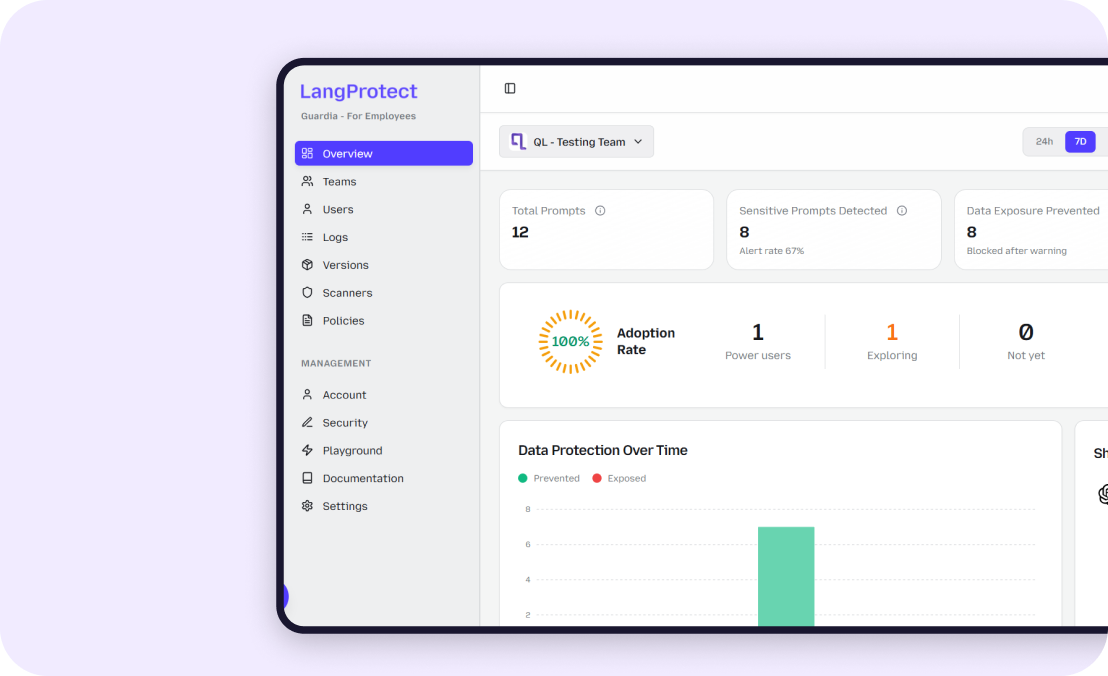


What Is AI Adoption Security? The Complete Enterprise Guide

Enterprise AI adoption is accelerating faster than the security frameworks designed to govern it. Employees are deploying AI tools, embedding them into workflows, and submitting sensitive business data through them, often before a single security control has been reviewed or applied.
The result is a structural gap that traditional security stacks cannot close. According to Cisco's State of AI Security 2026, the average organisation takes four months to formally review a new AI tool after it is already in production use.
In that window, sensitive data moves through unaudited systems, to unapproved vendors, with no prompt-level logs and no compliance evidence for the regulator who will eventually ask for it.
This is not a theoretical risk. It is the defining enterprise security failure pattern of 2026, and it has nothing to do with external attackers. It is an adoption problem. AI is entering the enterprise faster than controls are following it.
This guide defines what AI adoption security means as a discipline, why it is structurally different from traditional AI security, the five controls every enterprise must have before adoption scales further, and a 90-day roadmap to build them in a way that satisfies both your security team and your compliance obligations under the EU AI Act and DORA.
Is Your AI Adoption Already Creating Security Gaps?
See exactly what AI tools your employees are using, and what data is moving through them.
What Is AI Adoption Security, and Why Is It Different from AI Security?
AI adoption security is the discipline of securing the process by which employees, applications, and agents adopt and use AI tools, not just the models themselves. It addresses the security gap that opens between the moment AI enters your environment and the moment controls catch up to it.
Most enterprise security frameworks focus on the model layer, adversarial attacks, data poisoning, model theft, and infrastructure hardening. The Snowflake AI Security Framework covers 19 distinct threat categories at this layer. OWASP's LLM Top 10 maps the most critical risks in production LLM systems.
Both are essential references, but neither addresses what happens when an employee pastes client contract data into a public AI tool at 9am on a Monday. That is an adoption security problem, not a model security problem.
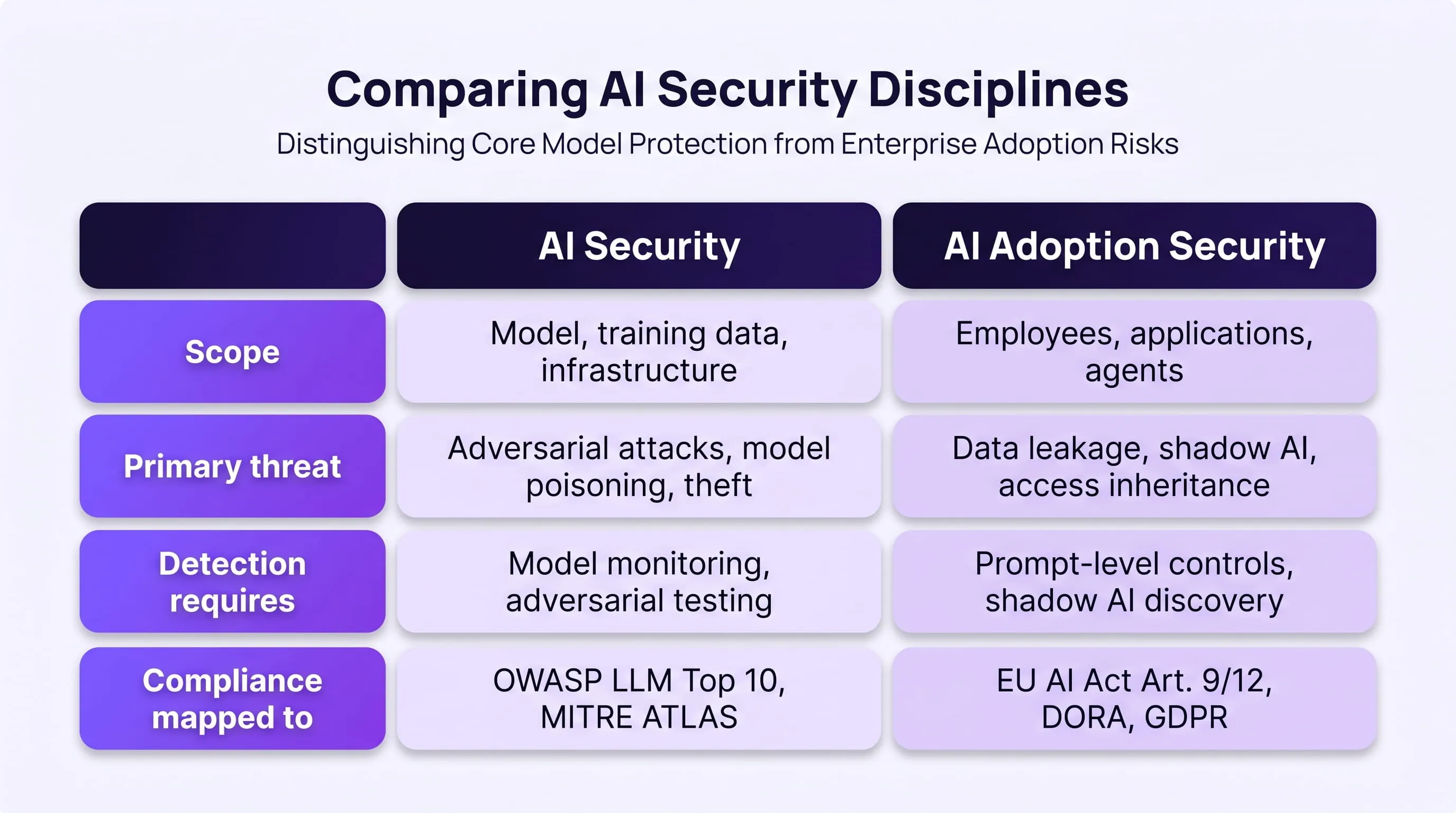
The distinction matters because the controls required are different, the teams responsible are different, and the compliance obligations triggered are different.
The 4-Month Security Review Gap
The gap between adoption and security review is measurable. Cisco's State of AI Security 2026 found that enterprises take an average of four months to formally review an AI tool that is already running in production. During that window, sensitive data is moving through systems your security team has not audited, to vendors whose data retention policies you have not reviewed, generating no prompt-level logs and no compliance evidence.
Here is what that looks like in practice. Your SIEM captures this:
Action: HTTPS POST → api.openai.com
Status: 200 OK
Risk flag: None
What it does not capture is the prompt content:
"Summarise this contract for renewal review.
[47-page NDA containing client revenue figures,
termination terms, and named executive compensation details]"
This is why understanding why traditional security controls fail at the AI layer is the first step, your existing stack is not blind because it is broken. It is blind because it was never designed to see this type of data flow.
Why Your Security Stack Is Blind to AI Adoption Risks
Traditional security tools, SIEM, DLP, and firewalls, cannot detect AI adoption risks because they were built to monitor network traffic and match structured data patterns, not inspect unstructured, conversational data flowing through AI interfaces. The threats that emerge during AI adoption are categorically different from the threats these tools were designed to catch.
This is not a gap you can close by reconfiguring existing tools or tightening firewall rules. It is a structural blind spot, and it covers four distinct risk categories that are actively exploited in enterprise environments today.
Risk 1: Prompt-Level Data Leakage
Sensitive data submitted in natural language prompts generates no DLP alert. There is no structured pattern to match, no credit card format, no SSN regex, no file signature. A 47-page client NDA pasted into an AI summarisation tool looks identical to a recipe request from your security stack's perspective.
This is not a DLP configuration problem. It is a structural limitation. OWASP's LLM Top 10 dentifies prompt injection and sensitive data disclosure as the two highest-priority risks in enterprise LLM deployments, both operating exclusively at the prompt layer, below the visibility threshold of traditional controls.
In our analysis of enterprise AI deployments, the most common data categories leaked through prompts include:
- Customer PII — names, contact details, account numbers pasted into AI drafting tools
- Internal financial data — revenue figures, forecasts, and deal terms submitted to AI summarisation tools
- Legal contracts — NDAs, vendor agreements, and termination terms processed through AI document tools
- HR records — compensation data, performance reviews, and headcount plans used in AI-assisted reporting
Employees using AI tools for exactly what they were designed to do process complex information quickly. The problem is that security controls were never extended to that layer.
What This Looks Like in Practice
A financial analyst uses an AI tool to draft a client report. To save time, they paste raw account data directly into the prompt. The output is useful and accurate. The data, account numbers, portfolio valuations, client names, has now been submitted to a third-party model under data retention terms the security team has never reviewed. No alert fired. No log captured the content. No audit trail exists for the regulator who will ask for one.
This is why understanding why traditional security controls fail at the AI layer is foundational, your existing stack is not broken. It simply was not designed to see this category of data flow.
Risk 2: Shadow AI Sprawl
Shadow AI refers to AI tools used by employees without IT or security approval. It is the fastest-growing unmonitored data surface in enterprise environments and the most consistently underestimated risk in CISO threat models.
FireTail's April 2026 research found that over 80% of workers use unapproved AI tools, including nearly 90% of security professionals. The people responsible for enforcing your AI policy are statistically the most likely to be bypassing it.
The risk profile of each shadow AI tool includes:
- No vendor security assessment — data retention policies, training data usage terms, and breach notification SLAs are unknown
- No access controls — the tool operates outside your IAM framework entirely
- No audit trail — no prompt-level logs, no policy enforcement records, no compliance evidence
- No incident response coverage — if a breach occurs through a shadow AI tool, your IR playbook has no defined workflow for it
- No data classification — PII, PHI, and confidential business data are submitted without classification or redaction
As we explored in detail in why banning AI tools creates more shadow AI risk, the instinct to block access consistently makes the problem worse. Employees find unapproved alternatives faster than IT can block approved tools, and those alternatives carry zero security review.
Why Discovery Must Come Before Enforcement
The correct sequence is discover, then govern, then enforce, in that order. Enterprises that deploy blocking controls before completing a shadow AI audit consistently generate more unmonitored data flows, not fewer. When employees lose access to a sanctioned tool without a governed alternative, they find their own solution within hours. That solution has no security review, no audit trail, and no incident response coverage whatsoever.
Risk 3: AI Agent Access Inheritance
AI agents, autonomous systems that take actions on behalf of users, create an identity and access management problem that most enterprise IAM frameworks were not designed to handle. Agents do not have their own identity. They inherit permissions from the user or service account that created them, often accessing far more data than the task they were built for requires.
Gartner's 2026 cybersecurity priorities identify IAM for non-human identities as one of the most urgent unaddressed gaps in enterprise security architecture. AI agents fall squarely into this category. They authenticate, query databases, call APIs, read and write to systems, all without a human in the loop and without the access boundaries that human identities typically operate within.
The specific access risks AI agents introduce include:
- Permission inheritance — an agent created by a senior executive inherits C-suite level access to systems the agent's task never required
- Lateral movement — agents that can call multiple APIs can traverse data boundaries that human workflows would never cross
- Persistent sessions — unlike human users who log out, agent sessions can persist indefinitely with no automatic expiry or review
- No MFA requirement — most agent authentication flows bypass multi-factor controls entirely
The MCP Compounding Problem
Model Context Protocol (MCP) servers, the integration layer that connects AI agents to external tools and data sources, compound this problem at scale. Over 13,000 MCP servers were published on GitHub in 2025 alone, with no standardised vetting, sandboxing, or security audit requirement. Each MCP connection is a new access pathway that your IAM team has almost certainly never reviewed.
When an employee connects an AI agent to an MCP server that accesses your CRM, your document storage, and your email system simultaneously, that agent can traverse three separate data environments in a single workflow. Your IAM logs show one authentication event. The actual data accessed spans your entire customer record system.
Risk 4: Compliance Evidence Gaps
The EU AI Act and DORA have moved AI security from a best-practice conversation into an active enforcement reality with defined deadlines and material penalties.
EU AI Act Article 12 requires high-risk AI systems to maintain operational logs sufficient for post-hoc reconstruction of decisions and outputs. Article 9 mandates a continuous risk management system not a periodic audit report, but a documented, active monitoring process that runs alongside every AI deployment.
DORA requires 72-hour ICT incident notification for EU financial institutions and documented risk management across all digital operational functions, which includes any AI system processing financial data.
The compliance evidence gap appears when enterprises check what they currently have against what regulators will require:
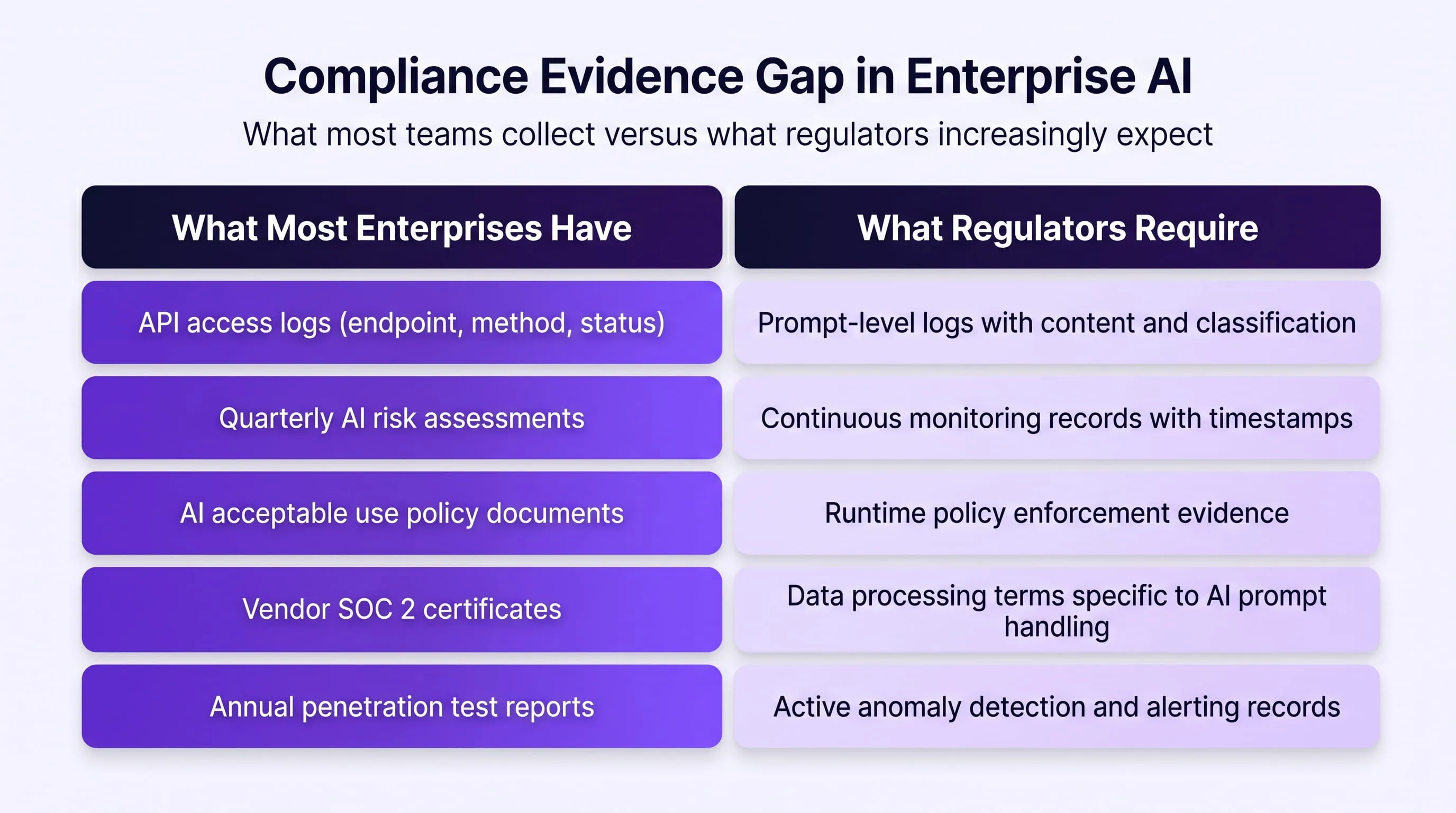
The gap between these two columns is not a documentation problem. It is a technical infrastructure problem, and it cannot be closed by updating a policy document.
For a detailed view of how this plays out in healthcare specifically, see how AI chatbots expose PHI outside DLP coverage. The same structural gap applies across every regulated industry, from financial services to legal to government.
The 5 Controls Between AI Adoption and Your Next Breach
AI adoption security requires five controls that operate at the AI interaction layer, not the network layer. Each one addresses a specific risk category that traditional security tools structurally cannot reach, and together they form a complete defensive layer across the full AI adoption surface.
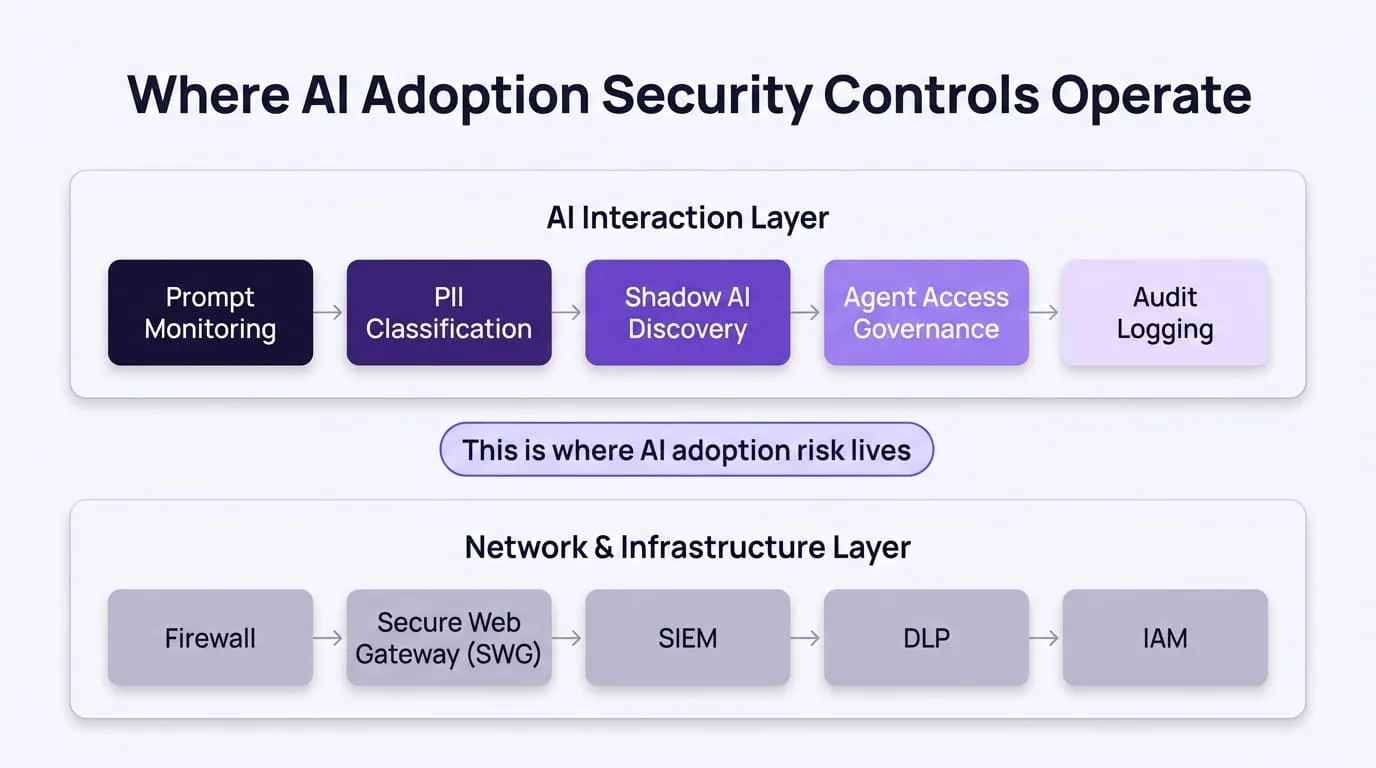
Control 1: Real-Time Prompt Monitoring
Real-time prompt monitoring inspects every prompt and every model response at the AI input/output layer, before data moves and before a response is returned. It is the foundational control without which every other layer is incomplete.
Unlike DLP, which scans outbound network traffic for structured patterns, prompt monitoring operates at the semantic level. It analyses the meaning and content of what is being submitted, detecting sensitive data expressed in natural language, indirect prompt injection attempts hidden in documents or emails, and jailbreak attempts disguised as legitimate business queries.
What real-time prompt monitoring detects that your current stack misses:
- Indirect prompt injection — malicious instructions embedded in a document the employee asks the AI to summarise. The EchoLeak exploit (2025) demonstrated this at scale: a single email with hidden instructions caused Microsoft Copilot to extract and exfiltrate enterprise files with zero user interaction. Prompt monitoring would have caught the injected instruction before execution.
- Sensitive data in natural language — client names, revenue figures, contract terms expressed as normal text with no structured pattern to trigger DLP
- Jailbreak attempts — adversarial prompts designed to bypass the model's safety controls and extract system prompt content or confidential training data
- Policy violations — prompts that violate your AI acceptable use policy, detected and blocked at the point of submission rather than discovered in a quarterly audit
OWASP's LLM Top 10 ranks prompt injection as the single highest-priority risk in production LLM deployments. Without a prompt-level monitoring layer, your organisation has no detection capability for the #1 enterprise AI threat.
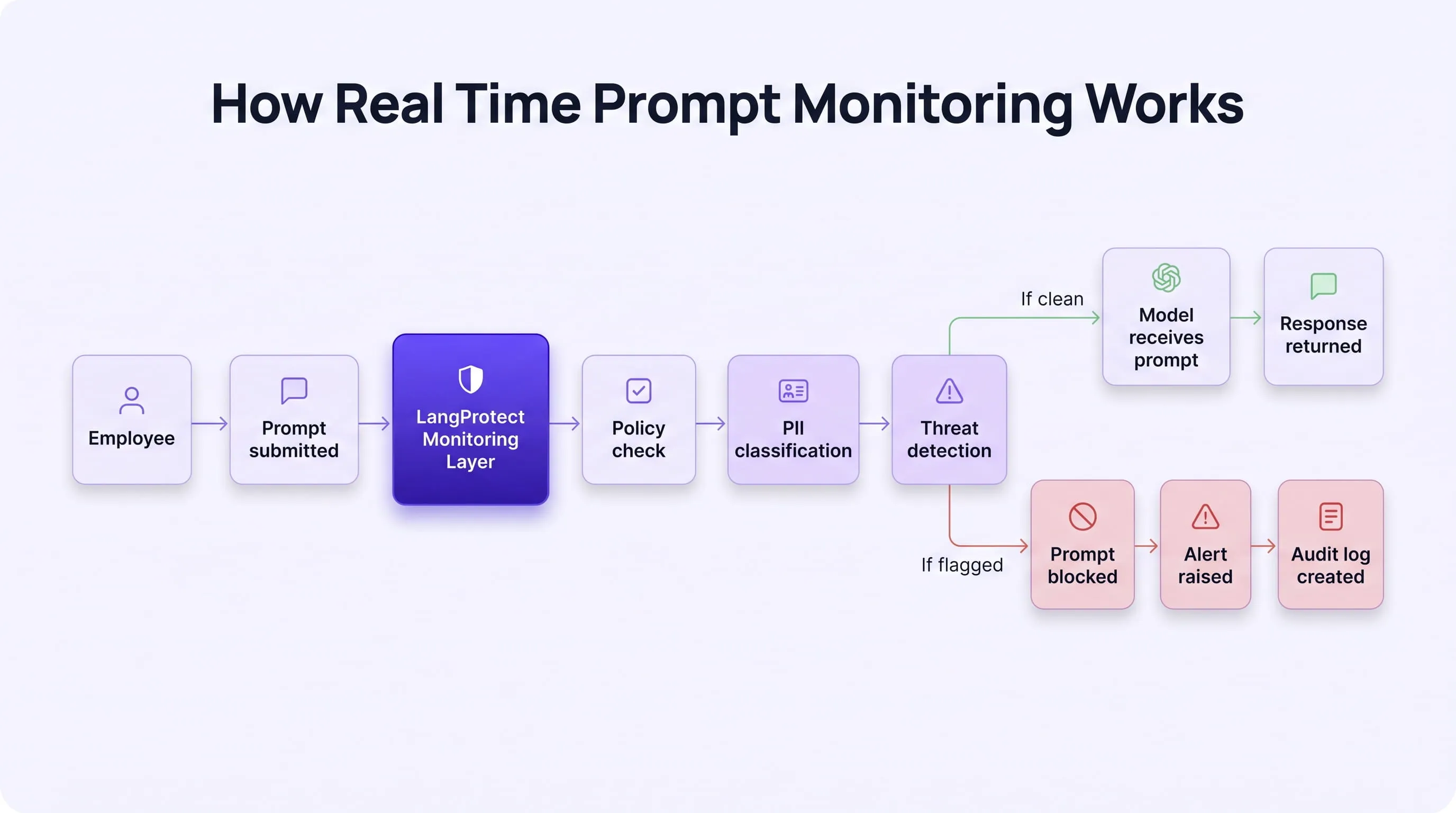
Control 2: PII and PHI Classification at the AI Layer
HIPAA, GDPR, and the EU AI Act all apply to data submitted in AI prompts, regardless of whether the employee intended to share it or understood the implications of doing so. Standard DLP has no classifier for natural language PHI submitted conversationally. Classification must happen before the prompt reaches the model, not at the output layer after the data has already been transmitted.
AI-layer PII and PHI classification works by:
- Identifying sensitive data categories in natural language before prompt submission(names, dates of birth, account numbers, medical record identifiers, compensation figures)
- Redacting or blocking prompts containing regulated data categories based on configurable policy rules
- Generating classification records that form part of your GDPR Article 32 and EU AI Act Article 12 compliance evidence
For a detailed breakdown of how this gap creates direct HIPAA exposure in healthcare environments, see how AI chatbots expose PHI outside standard DLP coverage . The same structural vulnerability exists in financial services, legal, and any regulated sector where employees use AI to process client data.
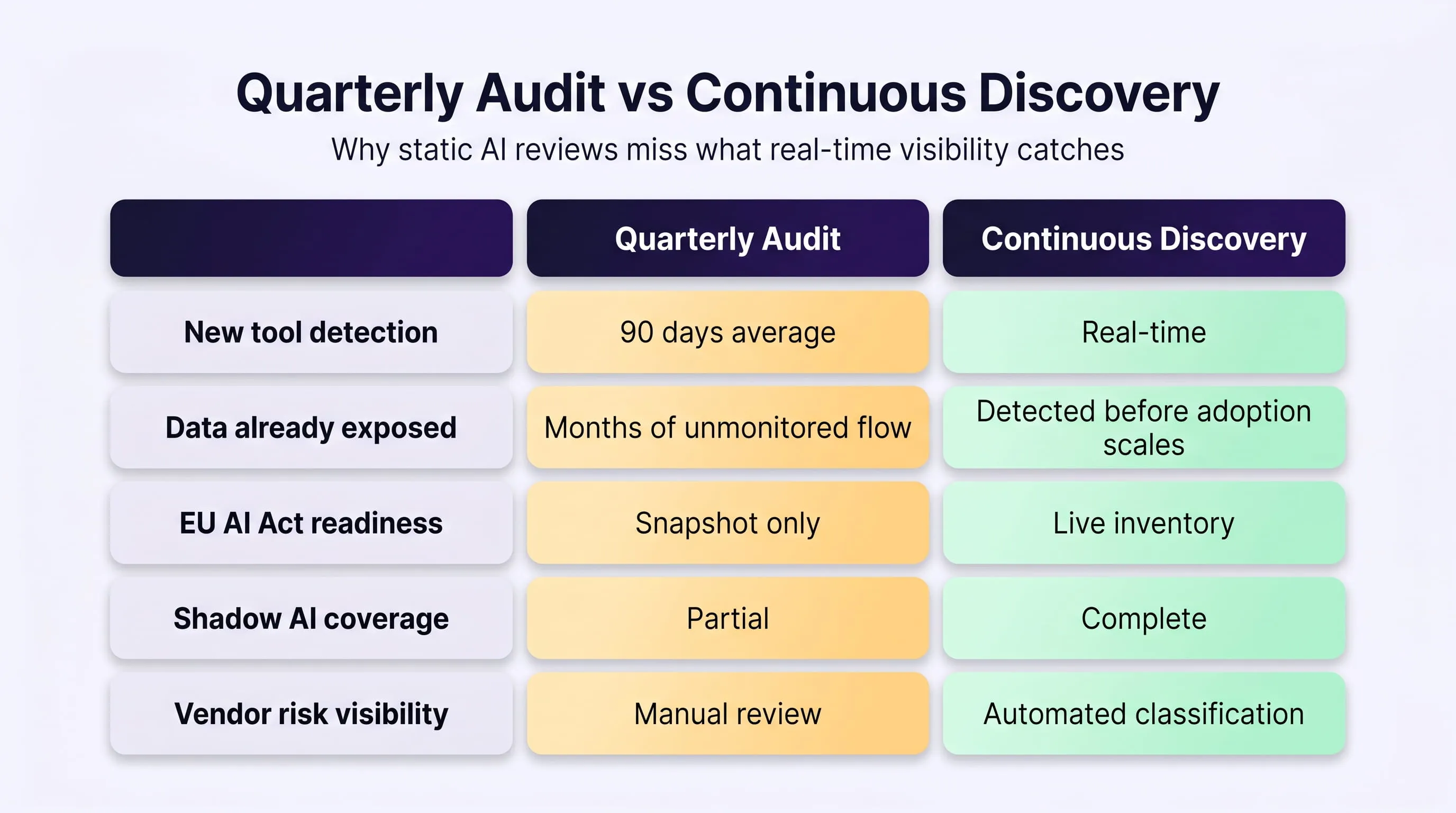
Control 3: Continuous Shadow AI Discovery
Continuous shadow AI discovery means every new AI tool that enters your environment is detected the moment it appears, not 90 days later in a spreadsheet audit. Point-in-time quarterly reviews are structurally incapable of governing AI adoption because a new AI browser extension can be installed and start exfiltrating data in hours.
What continuous discovery produces that quarterly audits cannot:
- A live AI asset inventory — every tool, every user group, every data type accessed, updated in real time
- Risk-tiered tool classification — each AI tool assessed against EU AI Act Annex III high-risk criteria automatically
- Vendor security visibility — data retention policies, training data usage terms, and breach notification SLAs surfaced for each tool in use
- Shadow AI detection — unapproved tools identified and flagged before sensitive data has been moving through them for months undetected
This inventory is also your EU AI Act compliance starting point. You cannot classify what you cannot see. You cannot govern what you have not discovered. As we covered in why banning AI tools creates more shadow AI risk, blocking without discovery consistently produces more unmonitored data flows, not fewer.
Control 4: AI Agent and MCP Access Governance
AI agents must be governed as non-human identities with their own access policies, not as extensions of the human user who created them. Without explicit least-privilege controls at the agent level, every AI agent in your environment is a potential lateral movement risk operating with permissions no one explicitly reviewed.
What Least-Privilege for AI Agents Requires
Applying least-privilege to AI agents means defining and enforcing:
- Explicit data source permissions — each agent is permitted to access only the specific data sources its task requires, with all others blocked at the tool level
- API call restrictions — agents are limited to specific API endpoints and methods, preventing unauthorised system interactions
- Session time limits — agent sessions expire automatically rather than persisting indefinitely with active credentials
- Action scope boundaries — agents that are permitted to read data are explicitly blocked from write or delete operations unless specifically authorised
- MCP server vetting — every MCP server connection is assessed before the agent is permitted to use it, with unvetted servers blocked by default
Microsoft's Azure Cloud Adoption Framework provides a strong governance model for Azure-hosted AI environments. It does not, however, address the prompt-interaction layer or MCP-level access controls, which is where the majority of agent access risk currently concentrates.
Control 5: Audit-Ready AI Logging
Audit-ready AI logging is the control that makes every other control provable to a regulator. Without it, your monitoring, classification, discovery, and access governance controls exist, but you cannot demonstrate that they were active, effective, and compliant at any given point in time.
What audit-ready logging captures that standard API logs do not:
- Prompt content or cryptographic hash — what was submitted, or a verifiable record that it was inspected
- Data classification result — what sensitive data categories were detected in the prompt
- Policy enforcement action — what rule fired, what action was taken (blocked, redacted, allowed, alerted)
- User identity and timestamp — who submitted the prompt and when, with full session context
- Model response record — what the model returned, for output monitoring and post-incident investigation
- Retention metadata — how long the log is retained and under what policy, satisfying GDPR Article 5(1)(e) storage limitation requirements
How the 5 Controls Work Together
No single control is sufficient on its own. Prompt monitoring without shadow AI discovery misses the tools that never received a security review. Shadow AI discovery without audit logging produces a governance record with no enforcement evidence. Audit logging without PII classification generates logs that confirm data was submitted but cannot prove it was protected.
The five controls form a closed loop:
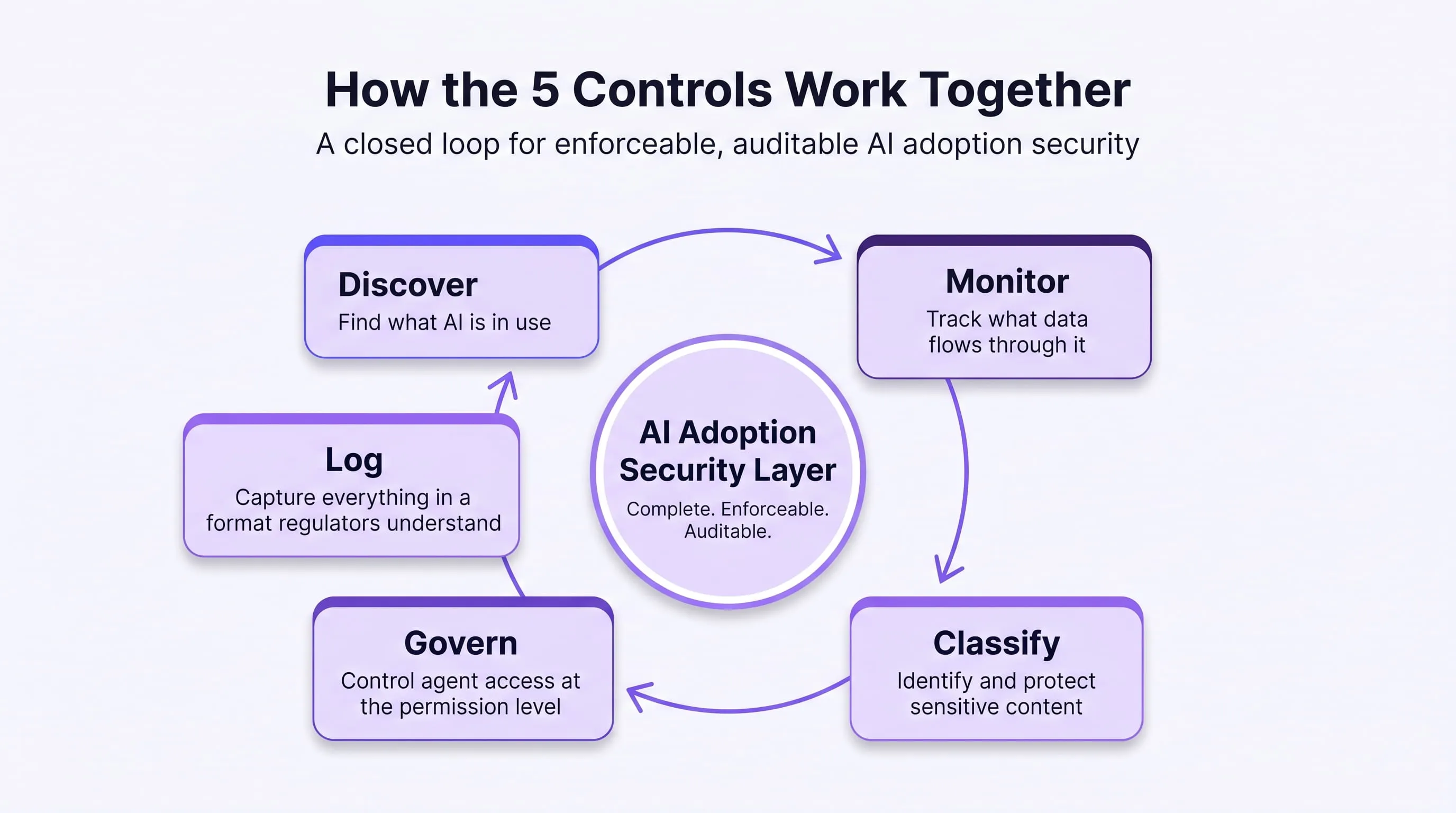
Together they create what enterprises currently lack: a complete, enforceable, auditable AI adoption security layer that operates at the interaction level rather than the network perimeter.
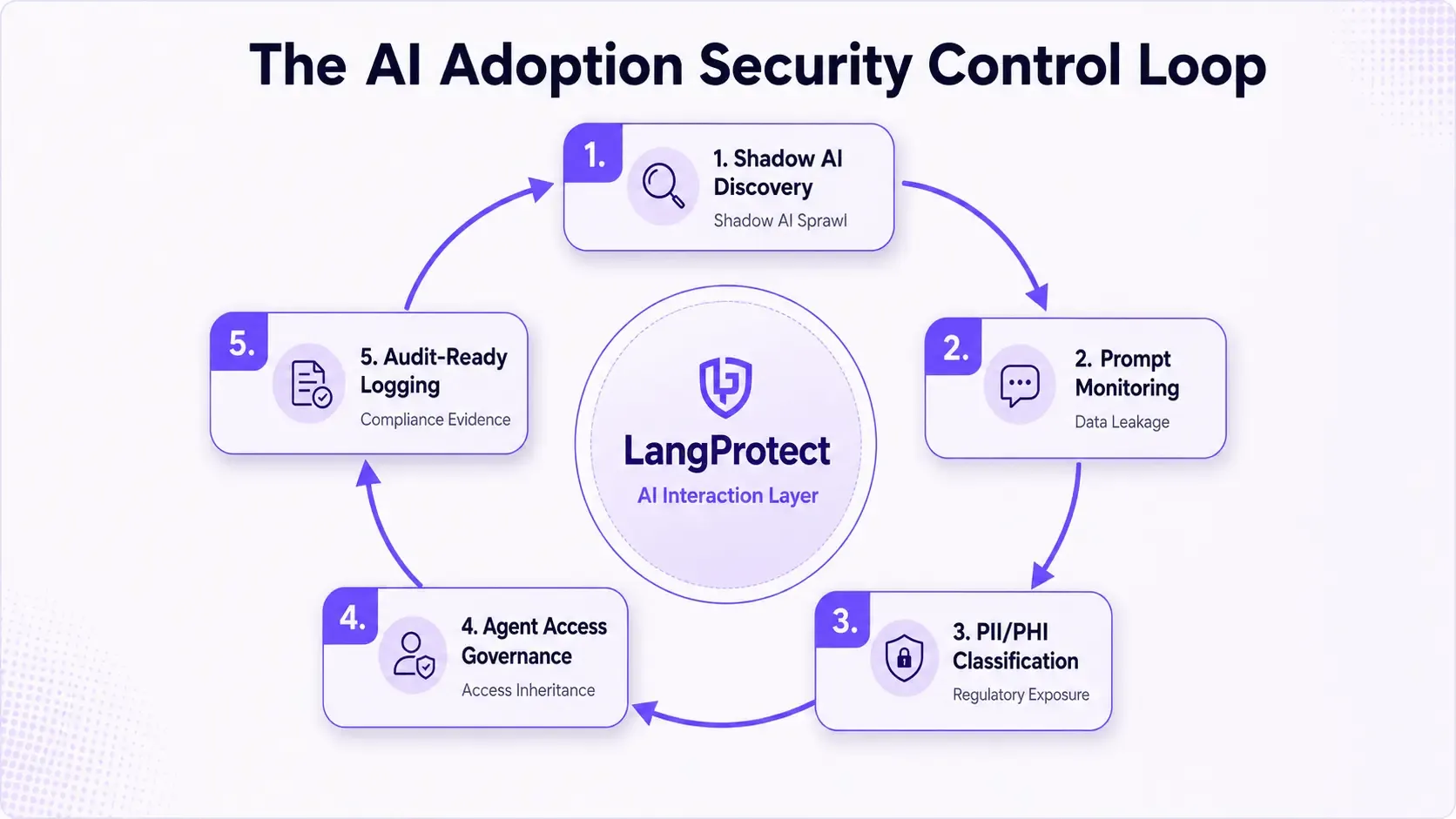
See All 5 Controls in Action
LangProtect enforces every layer at the prompt level, not just the policy document.
How to Build AI Adoption Security in 90 Days
Here is what is happening inside your organisation right now, whether you know about it or not.
Your engineering team is using Claude to debug proprietary code. Your sales team is pasting customer lists into ChatGPT to draft outreach emails. Your HR team is summarising compensation reviews in Gemini. Your DevOps engineers just started using Grok. Three people in finance discovered an AI tool you have never heard of last Tuesday.
None of this appears in your SIEM. None of it triggered your DLP. And none of it is in your AI tool registry, because most of those tools were never submitted for approval.
This is the reality of enterprise AI adoption in 2026. Employees are not waiting for IT governance cycles to approve the tools that make them more productive. They are adopting AI the same way they adopted consumer apps a decade ago, immediately, informally, and at scale. The difference is that AI tools process and generate sensitive data at a volume and speed that makes every unmonitored tool a live data governance risk.
Building AI adoption security in 90 days starts with accepting this reality and building controls around it, not against it.
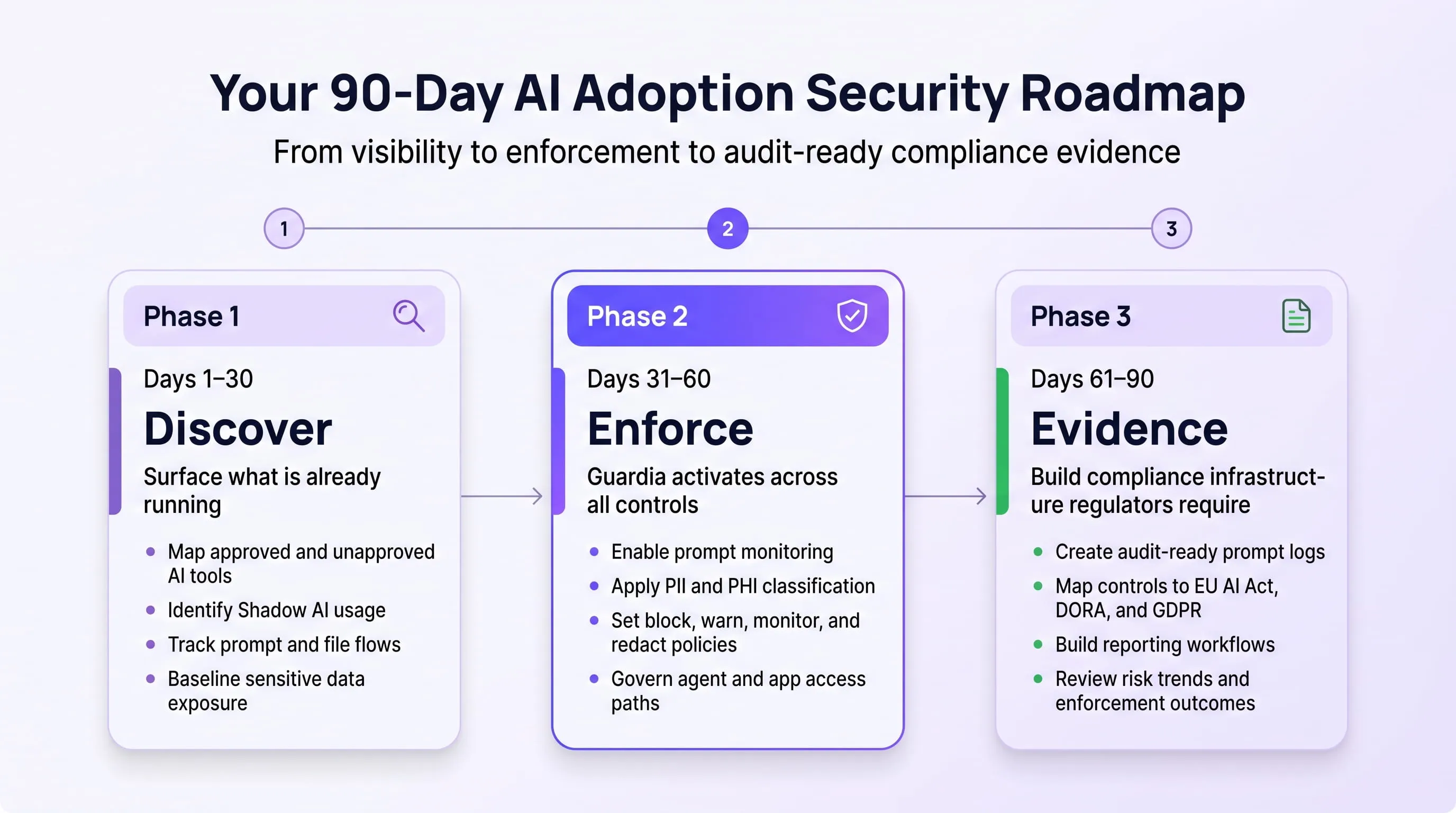
Phase 1 — Days 1 to 30: Surface What Your Employees Are Already Using
The first and most important question in AI adoption security is not "what AI tools have we approved?" It is "what AI tools are our employees actually using right now?"
These are almost never the same list.
In real Guardia deployments, the average enterprise discovers 121 AI applications in active use within the first 30 days, most of which were never submitted for IT or security review. Employees are not trying to circumvent policy. They are using the tools that help them do their jobs. The security gap is not intent, it is visibility. The CISO simply cannot govern what they cannot see.
The moment Guardia's browser extension is deployed across your organisation, shadow AI discovery activates immediately and permanently. It cannot be disabled, even when the active enforcement policy is set to Monitor-only mode. Every AI tool accessed through the browser, every domain, every subdomain, every white-labelled AI product built on a foundation model, is detected and logged automatically.
What Guardia Detects and When
Guardia triggers a discovery event under four conditions:
- An employee accesses a URL matching Guardia's continuously updated AI application signature database, covering known AI tool domains and subpaths across the internet
- An employee submits a prompt to any web interface matching Guardia's prompt interception heuristics, textarea submission patterns, API call signatures, and known AI interface structures
- A previously approved AI application begins exposing a new API endpoint or chat interface not present in its original registered profile, a capability expansion event that creates new data exposure
- An employee accesses a known AI tool from a new subdomain or alternate URL, including regional ChatGPT domains and white-labelled AI products built on GPT-4 or other foundation models
Every discovery event is immediate. The moment an employee opens an AI tool for the first time, it appears in the Guardia admin dashboard, before they have finished their first prompt.
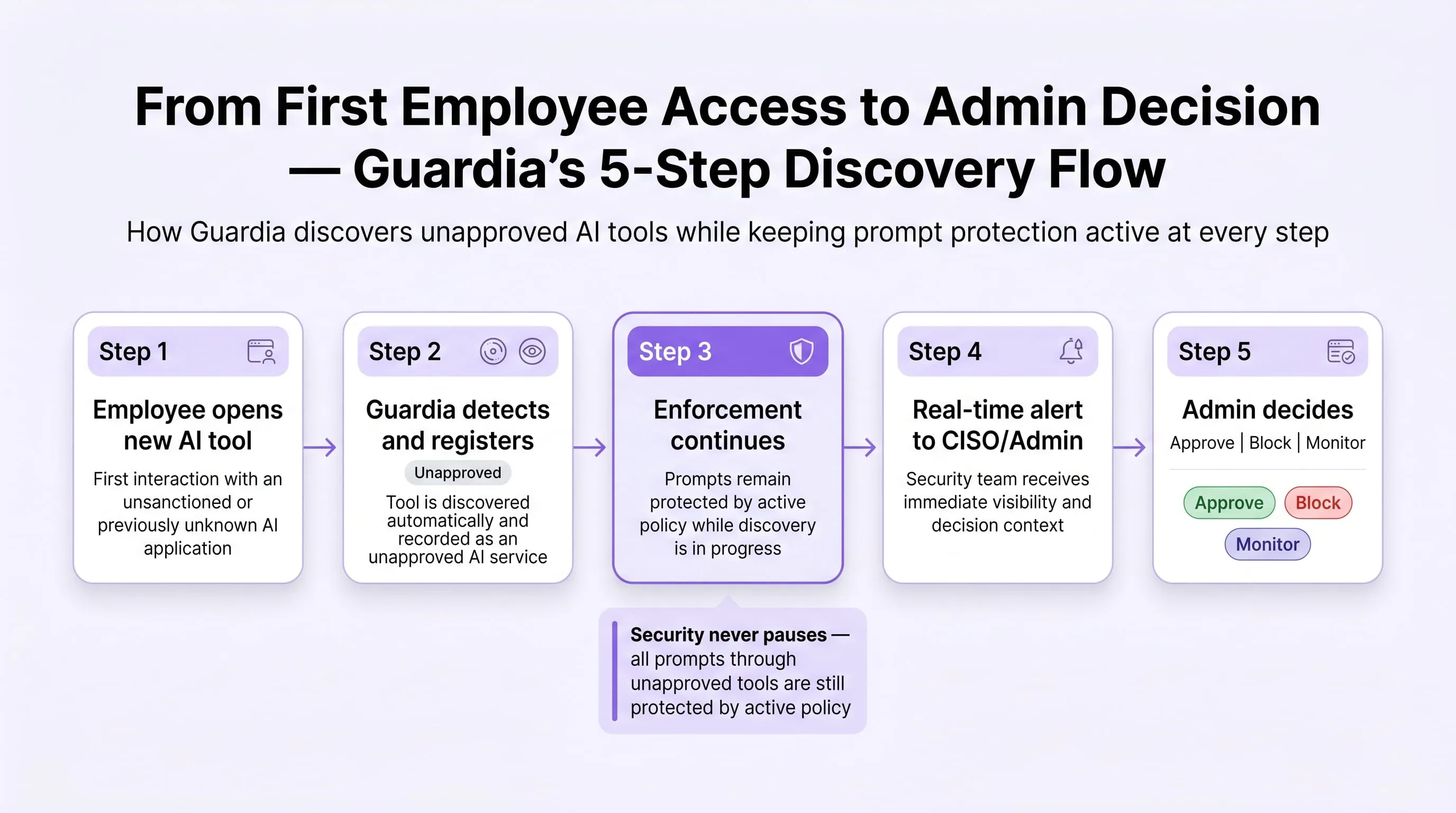
The Five-Step Shadow AI Discovery Flow
Understanding what happens when Guardia detects a new tool matters because it directly affects your governance posture during Phase 1:
- Step 1 — Detection. The extension intercepts the outbound request to the new AI application. It captures the application URL, domain, employee identity, team, timestamp, and the first prompt content, which is immediately passed through your active scanner policy and sanitised before logging. No raw PII or PHI is stored.
- Step 2 — Auto-registration. The application is immediately written to the Applications registry with a status of Unapproved. Risk classification begins asynchronously. The registry record is visible to admins the moment registration completes, which is within seconds of first employee access.
- Step 3 — Enforcement continues. This is the critical difference between Guardia and a simple discovery tool. Even though the application is unapproved and unreviewed, all employee prompts submitted through it are still subject to your active scanner policy. PII classification, PHI protection, credentials detection, and jailbreak blocking all apply to unapproved tools from the moment of first detection. There is no security gap during the discovery window.
- Step 4 — Admin alert. A real-time notification fires to your configured alert connectors, Microsoft Teams webhook or email, containing the application name, URL, discovering employee, team, sanitised first prompt, sensitive prompt rate so far, and risk assessment status. The CISO is notified before most employees in the organisation have heard of the tool.
- Step 5 — Admin decision. The admin reviews the application in the Approval Queue and makes one of three decisions: Approve (full access with continued monitoring), Block (all employee access blocked from that point), or Continue monitoring (application remains in the queue while usage data accumulates). The decision is fully audited, who approved it, when, and under what context.
What the Dashboard Shows Your Security Team in Phase 1
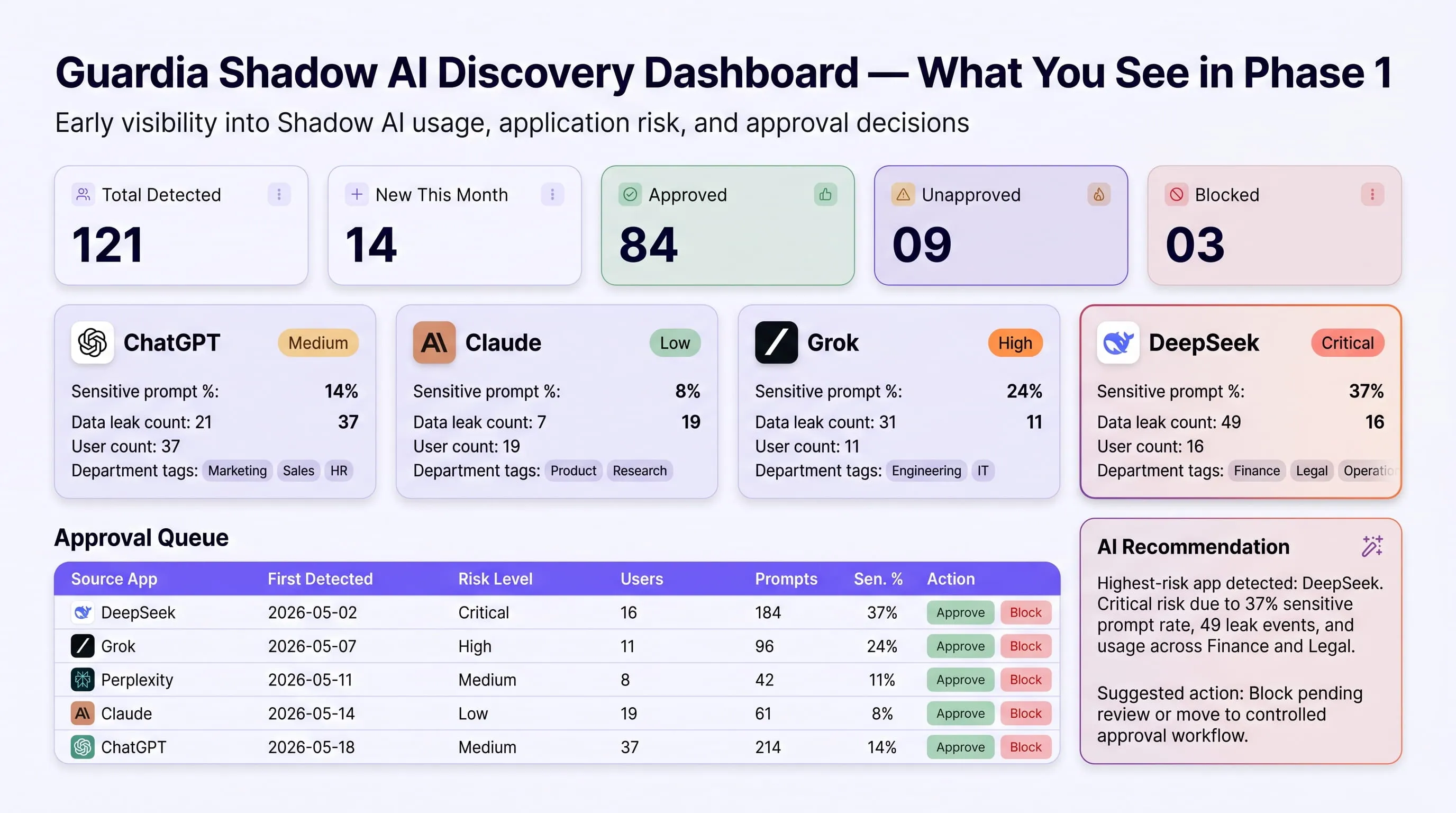
From the moment Guardia is deployed, your admin dashboard populates in real time with data your security team has never had before. The Applications view shows every AI tool in your environment with metrics that change continuously as employees use them:
Top-level discovery summary:
- Total AI applications detected across the organisation (observed: 121 in a single enterprise deployment)
- New applications detected this month with trend indicator
- Approved vs Unapproved vs Blocked count; updated in real time
- Risk level distribution across all detected applications
Per-application metrics, updated continuously:
- Total prompt volume and usage trend over the selected time period
- Sensitive prompt rate, the percentage of prompts that triggered at least one scanner, indicating what proportion of AI usage involves sensitive data
- Block rate, the percentage of prompts blocked by the active policy through this application
- Data leak events, the count of sensitive entity detections that were not redacted and were allowed through
- Department distribution, which teams are using this application and at what volume
- Top violation types, whether this tool is primarily a PII risk, a credentials risk, a PHI risk, or a source code exposure risk
Risk classification — automatic and continuously updated: Each detected application is automatically risk-tiered using Guardia's application risk classification database:
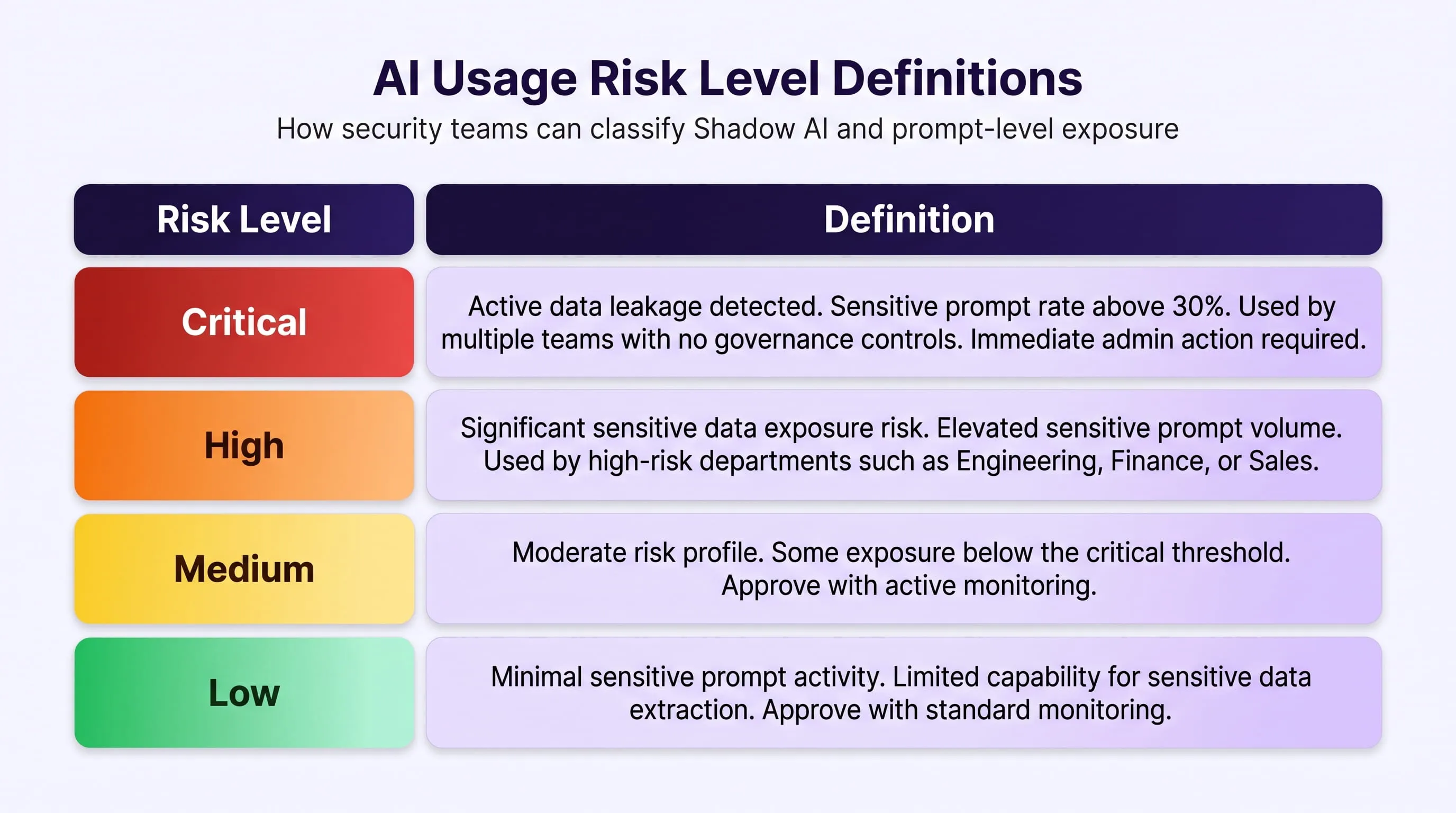
The AI-generated recommendation panel surfaces specific action guidance per application for example: "Consider blocking this application because Data Criticality is High. Current users should be redirected to a less risky alternative" with an inline Block action button so the admin never needs to leave the queue view.
What Phase 1 Tells You That You Didn't Know Before
By the end of Phase 1, your security team has answers to questions that were previously unanswerable:
- Which AI tools are employees using that IT has never approved? — Complete list, ranked by risk
- What sensitive data categories are flowing through each tool? — PII, PHI, source code, credentials, financial data, by volume and rate
- Which teams carry the highest AI adoption risk? — Department-level exposure breakdown per tool
- Which tools require immediate blocking vs. approval with monitoring? — Risk-tiered, with AI-generated recommendations
- What does your EU AI Act Article 9 risk management obligation actually cover? — Now answerable because you know what AI systems you are running
This is your governance foundation. Everything in Phase 2 is built on it.
Phase 2 — Days 31 to 60: Guardia Goes Live, All Controls Active in Under 30 Minutes
Phase 2 is where governance becomes enforcement, and this is where the timeline compresses dramatically compared to any traditional security tooling deployment.
Guardia deploys as a Chrome Manifest V3 browser extension, with support for Edge, Firefox, and Brave. There are no network changes. There is no proxy configuration. There is no server-side installation. Your IT team does not need to reconfigure firewall rules or update network topology.
Time to first active enforcement: under 30 minutes.
The moment Guardia is enrolled across your organisation, every control activates simultaneously. Shadow AI discovery was already running from Phase 1. Now prompt monitoring, PII and PHI classification, jailbreak detection, agent access controls, and audit-ready logging all go live at the same moment. There is no staged feature rollout. There is no configuration lag before your highest-risk exposures are protected.
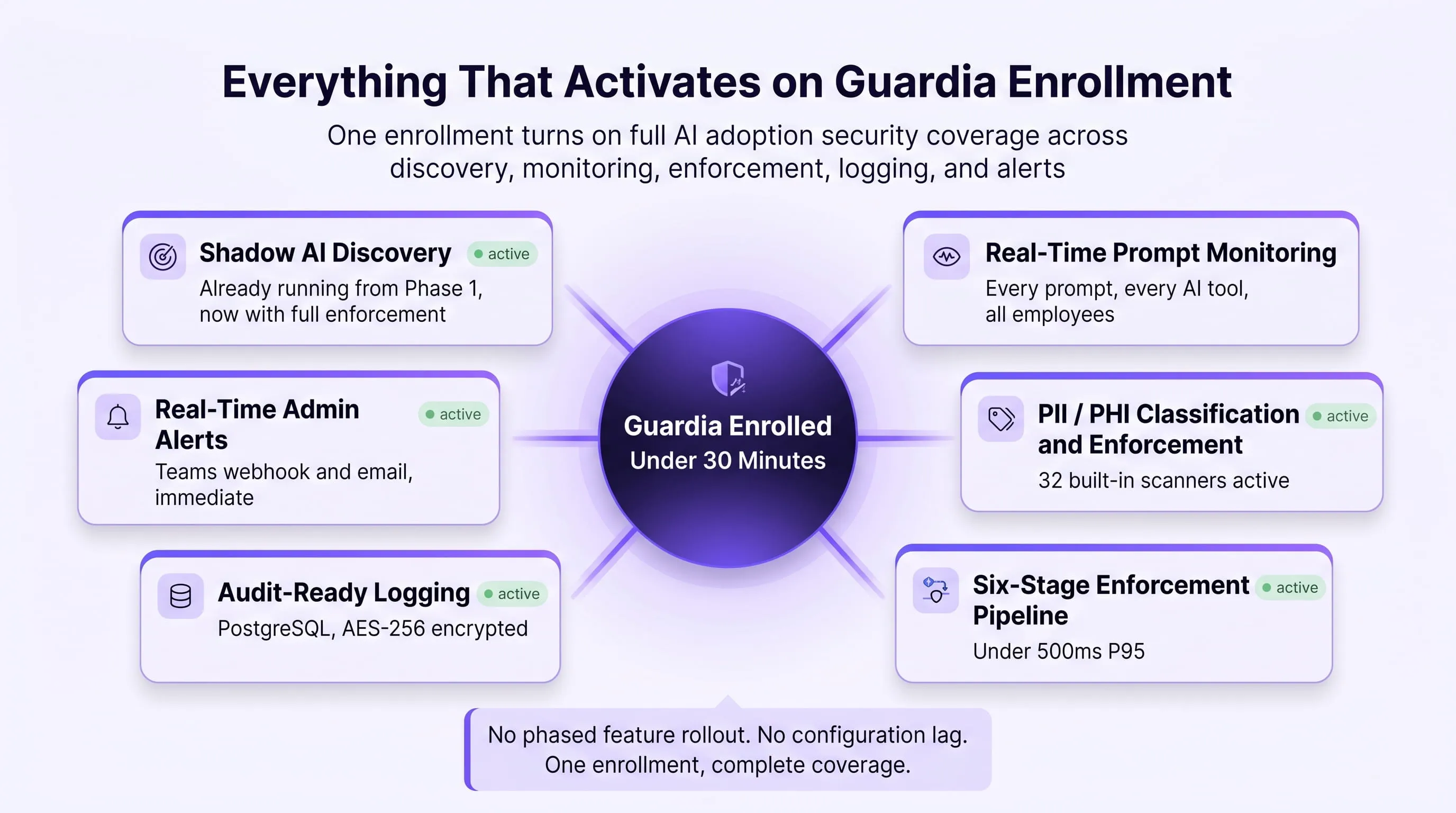
What Guardia Monitors From the Moment of Enrollment
Once enrolled, Guardia tracks every dimension of AI usage across your organisation — not at the network level where prompt content is invisible, but at the browser interaction layer where the data actually moves.
Per-employee tracking — visible in the People module:
Every employee with the Guardia extension installed has a complete usage profile accessible to security admins and analysts. This profile includes:
- Usage tier classification — Power User (high AI tool usage volume and frequency), Occasional (regular but moderate use), or Inactive (extension installed but no recent prompt activity). Power Users are your highest-risk segment by volume.
- Total prompt count — how many prompts this employee has submitted across all AI tools in the monitored period
- Sensitive prompt rate — what percentage of their prompts contained data that triggered at least one scanner
- Data exposure prevented — how many sensitive data events were intercepted and protected by enforcement controls
- Exposure risk — how many sensitive data events were allowed through, either by employee override or Monitor-mode policy
- Tool usage breakdown — which AI tools this employee uses and in what proportion (example: Claude 60.2%, ChatGPT 25.3%, Copilot 10%, Gemini 4.6%)
- Daily usage heatmap — a Monday to Friday, time-of-day activity grid showing when this employee is most active on AI tools — useful for identifying unusual access patterns
- Top AI use cases — what the employee is predominantly using AI for, classified by intent: content writing, code assistance, brainstorming, research, recruiting, and others
- Full violation log — every enforcement event attributed to this employee, with timestamp, tool, risk level, scanner triggered, and action taken
Per-team tracking — visible in the Teams module:
Security teams cannot investigate every individual employee. Guardia's team-level analytics surface the risk picture at the organisational unit level, letting security teams prioritise the highest-risk departments before drilling into individual users:
- Team violation type breakdown — whether a team's risk profile is dominated by PII exposure, source code leakage, PHI submission, credential sharing, or prompt injection attempts
- Shadow AI applications used by team — which unapproved tools a specific team is most actively using, ranked by usage volume and sensitive prompt rate
- Team adoption metrics — adoption rate percentage, active users vs total team members, session volume, and violation count
- Risk badge — automatically calculated from team violation history: Critical, High, Medium, or Low
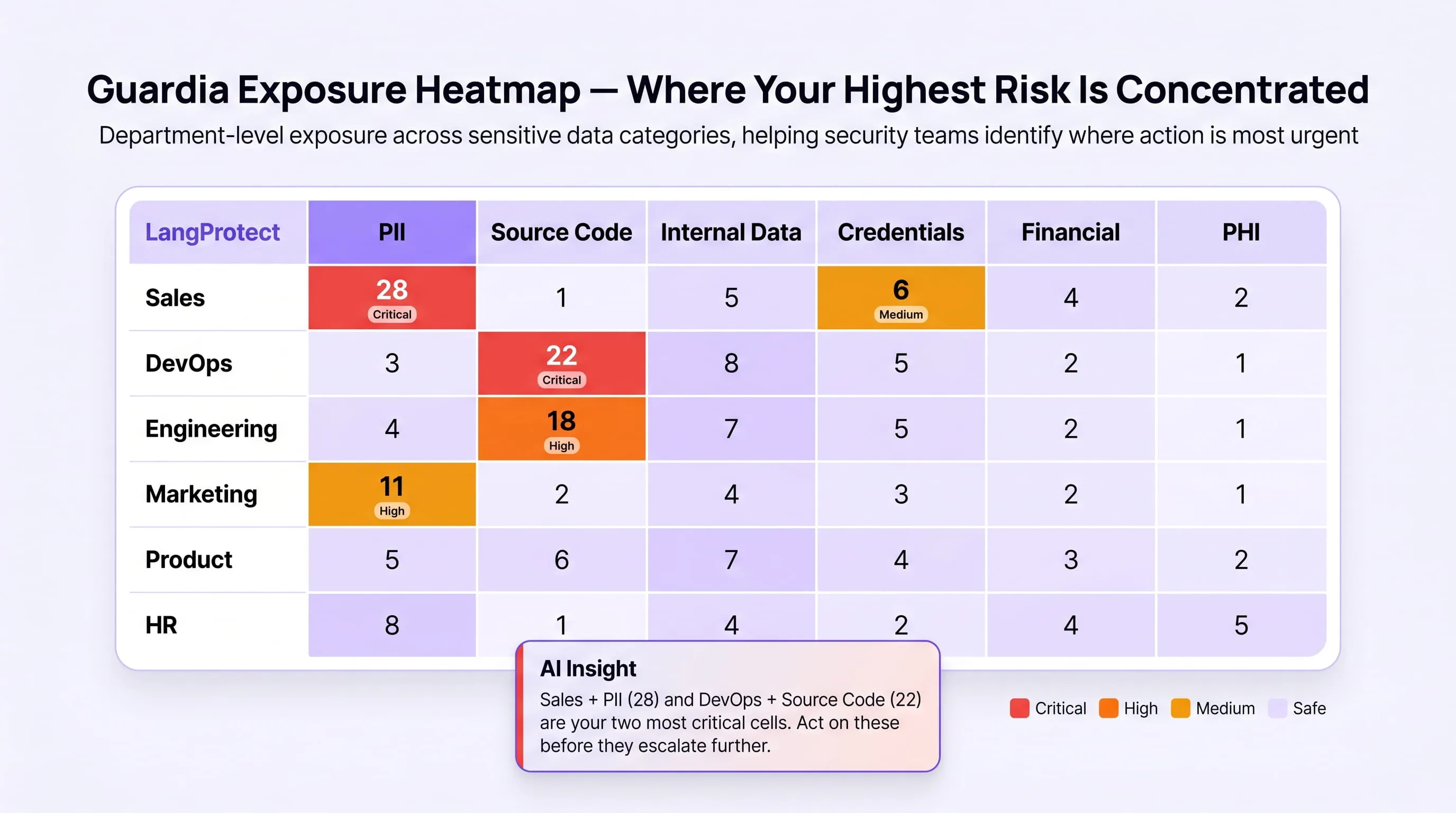
The Exposure Heatmap — your most actionable security view:
The Violations dashboard includes an Exposure Heatmap, a team-by-data-type matrix that visualises exactly where your highest-risk data exposures are concentrated across the organisation.
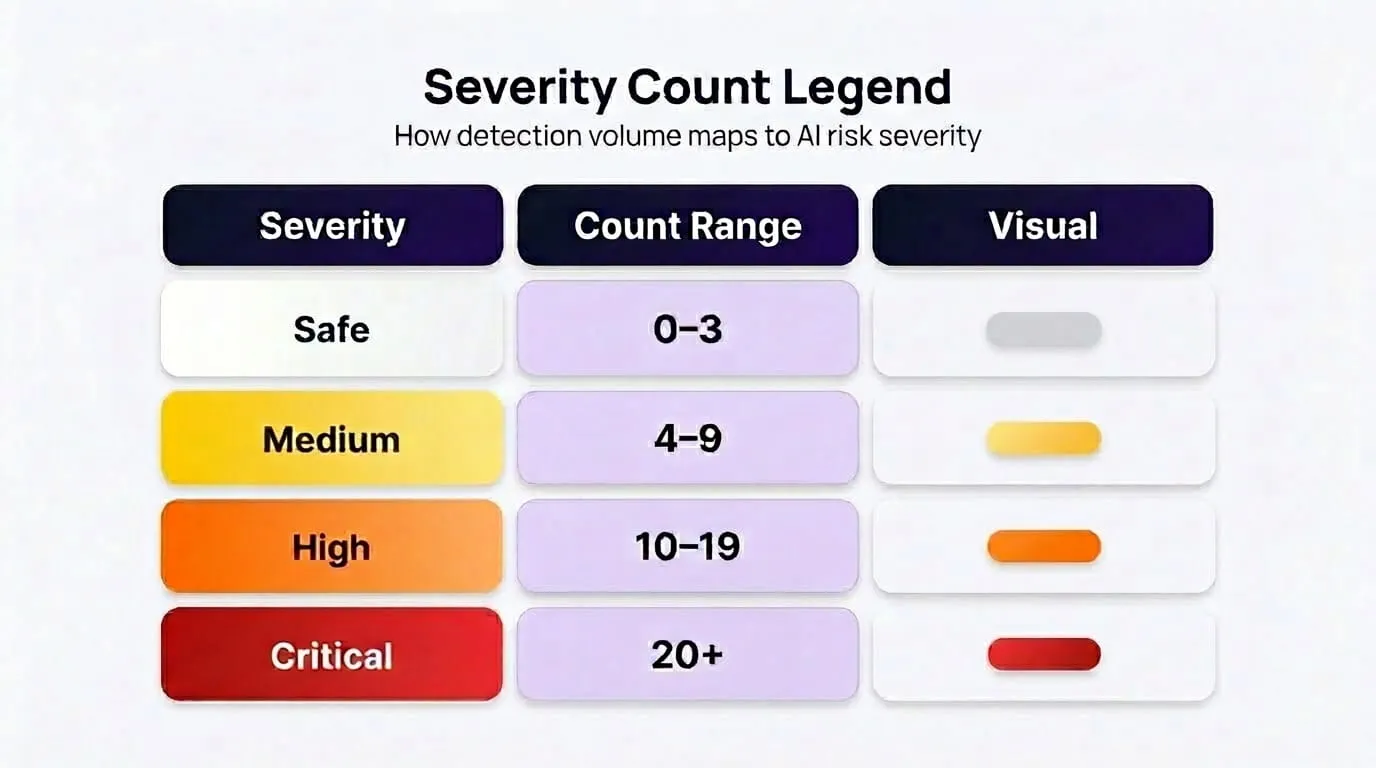
Rows represent teams (Sales, DevOps, Engineering, Marketing, Product, HR). Columns represent data types (PII, Source Code, Internal Data, Credentials, Financial, PHI). Each cell shows the violation count for that team and data type combination, colour-coded by severity:
Guardia generates an AI-driven callout beneath the heatmap identifying the two most critical cells, for example: "Sales + PII (28) and DevOps + Source Code (22) are your two most critical cells. Act on these before they escalate further." Clicking any cell opens a slide-in detail panel showing every individual violation log entry for that team and data type, employee names, timestamps, sanitised prompt excerpts, source applications, without navigating away from the heatmap view.
The Six-Stage Enforcement Pipeline: How Guardia Protects Every Prompt
Every prompt an employee submits to any AI tool passes through Guardia's six-stage enforcement pipeline before it reaches the model. The complete pipeline runs in under 500ms P95, below the threshold of perceptible delay for the employee.
- Stage 1 — Inbound Intercept. The browser extension captures the outbound prompt before transmission. Nothing has been modified yet. Full session context is captured: user identity, source application, timestamp, session ID.
- Stage 2 — Entity Detection and Tokenization. Guardia runs Microsoft Presidio's NER pipeline, detecting PII, PHI, credentials, and sensitive data in natural language. In Smart Redact mode (Guardia's recommended posture for regulated industries), detected entities are immediately replaced with typed token placeholders and real values are written to an AES-256 encrypted session vault:
Employee submits:
"Patient Jacob Stein (DOB 1968-04-17, MRN 7765102)
 referred by Dr Lisa Hammond to Neurology"
AI model receives:
"Patient [PERSON_6] (DOB [DATE_TIME_3], MRN [MRN_12])
 referred by [PERSON_7] to Neurology"
Real values: Encrypted session vault only. Never transmitted.
-
Stage 3 — Policy Evaluation. The sanitised prompt is evaluated against your active Guardia policy. Guardia's 32 built-in scanners run in parallel, pattern scanners (3–8ms), keyword scanners (2–5ms), Presidio NER (already complete from Stage 2), and the Intent Scanner (self-hosted LLM, 300–400ms) if configured. The highest-severity detection determines the enforcement decision.
-
Stage 4 — Enforcement Action. One of five outcomes executes:
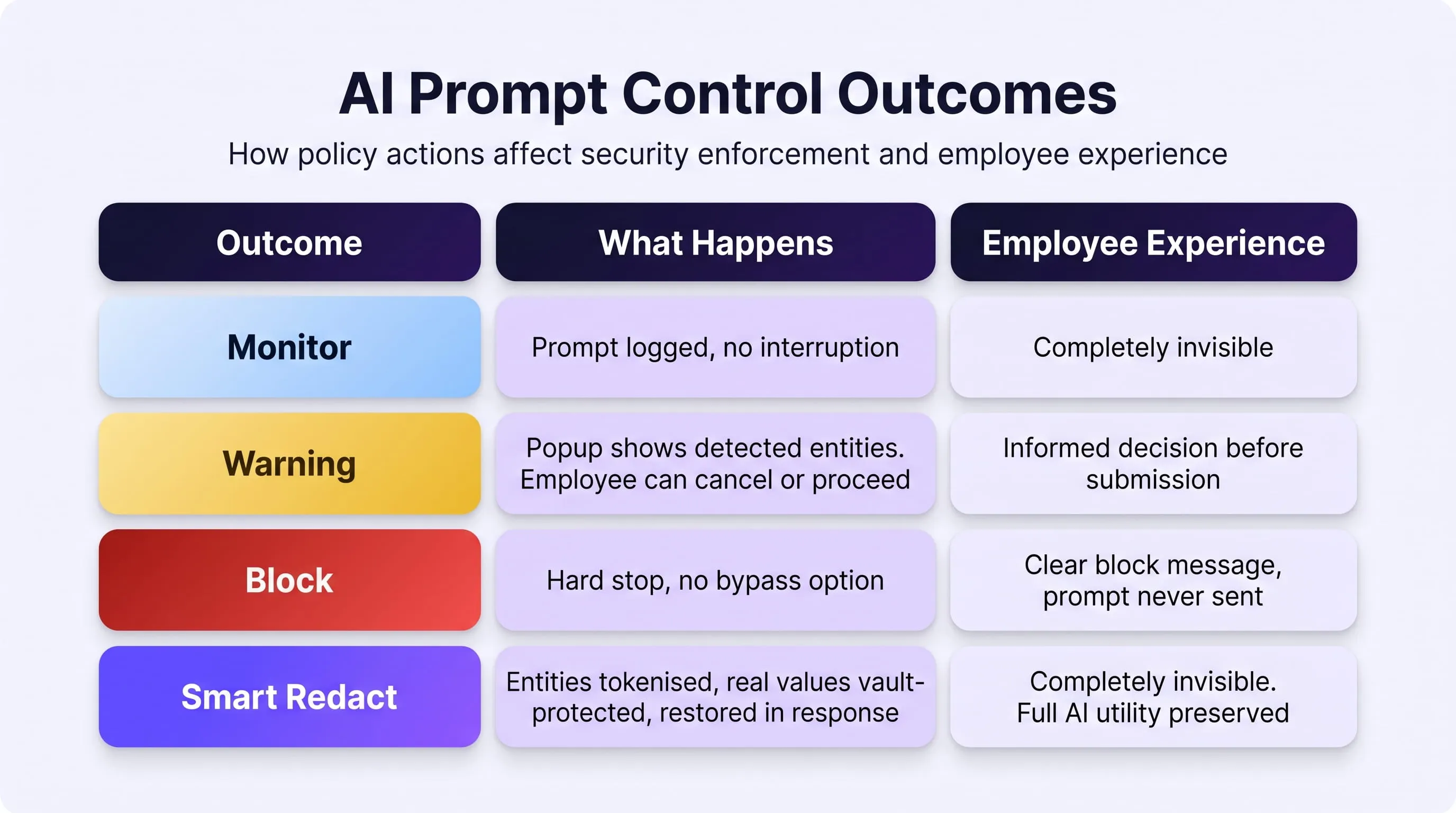
- Stage 5 — Response Interception. The AI model's response is captured before it renders in the browser. Output-direction scanners run — detecting toxic content, malicious links, leaked credentials in AI responses, and indirect prompt injection patterns embedded in the response itself. If indirect injection is detected, the response is withheld entirely and an immediate admin alert fires regardless of configured severity thresholds.
- Stage 6 — PHI Restoration and Audit Log. In Smart Redact mode, token placeholders in the AI response are replaced with real values from the session vault before the employee sees the response. The employee reads a complete, accurate response. The AI model never handled real PHI. A full audit record is written asynchronously to PostgreSQL — decoupled from the enforcement pipeline so log write latency does not affect the 500ms enforcement budget.
Policy Configuration, From Enrollment to Active Enforcement in Minutes
Guardia's policy system is designed to deliver enforcement without requiring engineering effort. An admin creates a security policy by selecting from 32 built-in scanners and configuring an enforcement outcome. The policy activates and propagates to every enrolled browser extension within 60 seconds.
For enterprises beginning their AI adoption security journey, Guardia's recommended initial policy configuration follows a simple progression:
- Week 1 after enrollment — Monitor mode across all 32 scanners. Establish baseline behaviour data before introducing any enforcement friction. Understand which data types are most commonly submitted, which tools carry the highest sensitive prompt rates, and which teams need the most attention.
- Week 2 onward — Activate Smart Redact for PII and PHI scanners. Employees notice no interruption. Sensitive data is protected before it reaches any AI model. Compliance evidence begins accumulating immediately.
- As confidence builds — Escalate source code and credentials scanners to Block. These cannot be safely tokenised, blocking is the appropriate control. Jailbreak and prompt injection scanners activate with Block outcome for all users.
Every policy change propagates to all enrolled browser extensions within 60 seconds, without requiring any action from employees, without any IT deployment cycle, and without any employee-facing configuration.
See Your AI Footprint in Real Time - Starting Today
Guardia surfaces every AI tool in your environment, every prompt, every sensitive data exposure, and every unapproved tool your employees are using, from the moment the extension is deployed.
Phase 3 — Days 61 to 90: Build the Evidence Layer Regulators Require
Phase 3 converts active enforcement into provable compliance. Controls that operate but cannot be demonstrated are controls that do not exist in a regulatory audit.
Guardia's audit logging infrastructure begins accumulating compliance evidence from the moment of enrollment, not from the moment you remember to configure a logging layer. By Day 61, you have 30 days of prompt-level enforcement records, policy activity logs, and incident data already written to PostgreSQL in audit-ready format.
What the complete Guardia audit record contains, written automatically for every enforcement event:
{
  "audit_id":             "grd_01HXY_abc456",
  "user_id":              "m.patel@company.com",
  "team_id":              "team_finance",
  "source_app":           "chat.openai.com",
  "input_type":           "text",
  "raw_prompt_encrypted": "AES256_GCM:<ciphertext>",
  "sanitized_prompt":     "Patient [PERSON_6] (DOB [DATE_TIME_3])...",
  "entities_detected":    [
    { "type": "PERSON", "token": "[PERSON_6]", "confidence": 1.00 },
    { "type": "DATE_TIME", "token": "[DATE_TIME_3]", "confidence": 1.00 }
  ],
  "policy_id":            "pol_phi_protection_v2",
  "scanners_triggered":   ["healthcare_phi_protection_v3"],
  "action_taken":         "SMART_REDACTED",
  "risk_level":           "HIGH",
  "latency_ms":           312,
  "timestamp":            "2026-05-20T10:14:12.312Z"
}
Every field maps directly to a regulatory requirement:
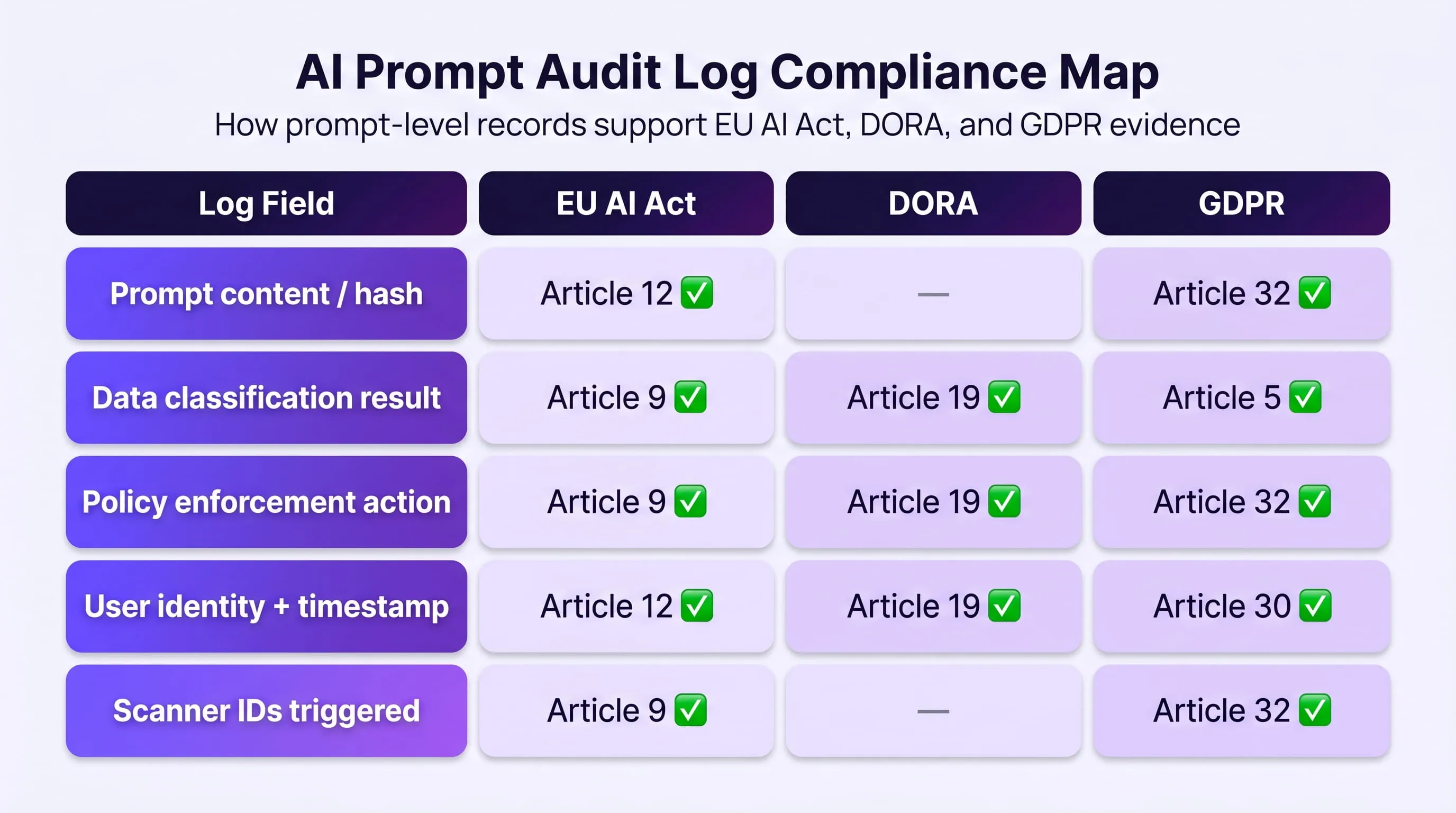
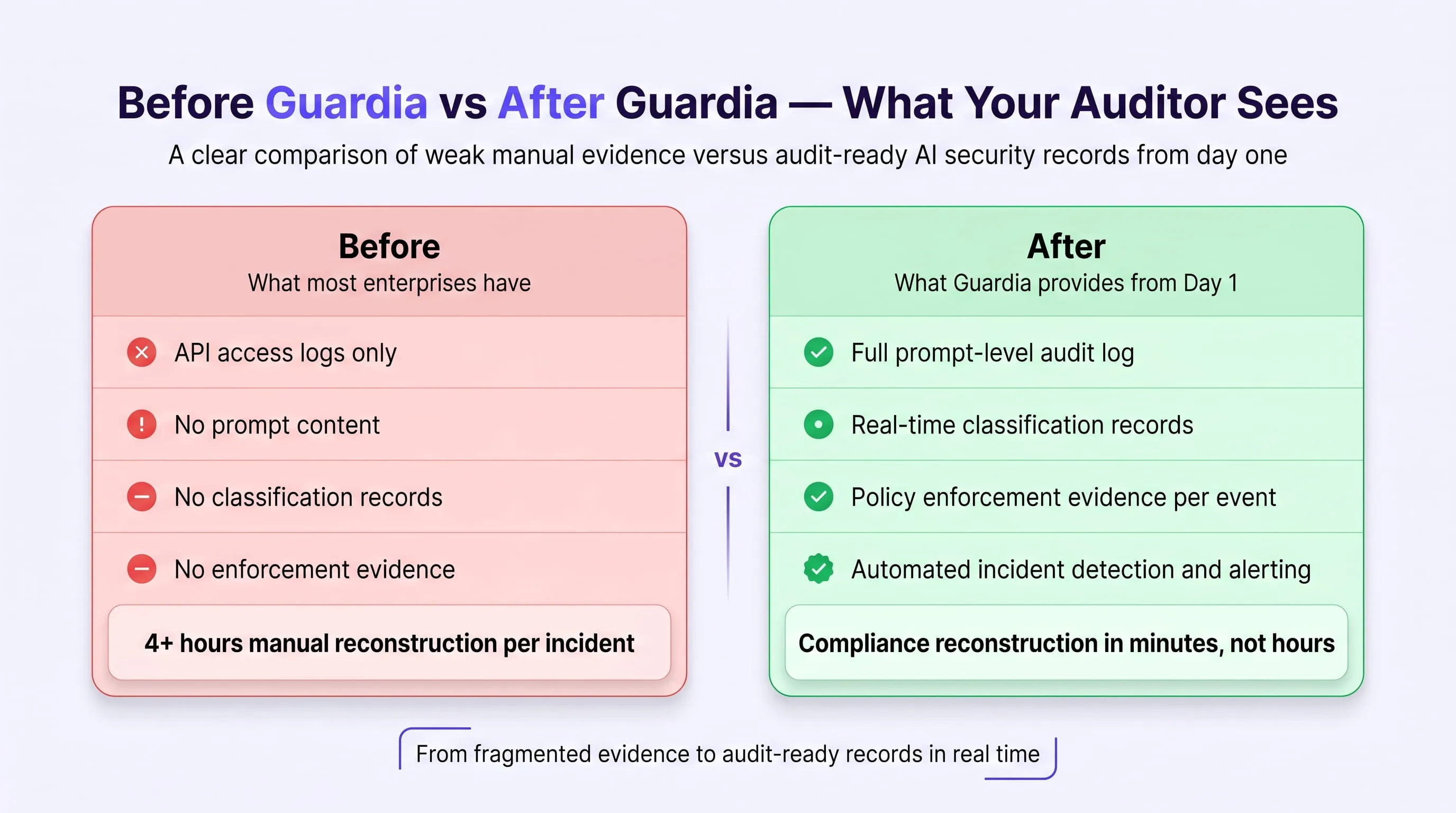
The Tabletop Exercise to Run at Day 90
At the end of Phase 3, run this exercise with your security team:
An AI vendor notifies you of a data breach at 9am. You have 72 hours under DORA to file your incident report and 72 hours under GDPR to notify your supervisory authority if personal data was affected. Can your team answer the following, within four hours?
- Which employees submitted data to this vendor's AI tools?
- What data categories were included in those prompts?
- What enforcement controls were active at the time?
- What is your notification obligation under GDPR and DORA?
- What evidence do you have that your security controls were functioning?
With Guardia's audit layer active from Day 31 onward, every one of these questions is a dashboard query, not a four-hour manual investigation across disconnected log systems. That is the operational difference between a security stack built for the network perimeter and one built for the AI interaction layer.
Frequently Asked Questions
Q: What is AI adoption security?
A: AI adoption security is the discipline of securing the process by which employees, applications, and agents adopt and use AI tools, not just the AI models themselves. It addresses the security gap that opens between the moment AI tools enter your environment and the moment controls catch up to them. This includes prompt-level data leakage, shadow AI running outside IT approval, AI agents inheriting unreviewed permissions, and the absence of compliance evidence that regulators now require under the EU AI Act and DORA.
Q: How is AI adoption security different from traditional AI security?
A: Traditional AI security focuses on the model layer, adversarial attacks, data poisoning, model theft, and infrastructure hardening. AI adoption security focuses on the human and process layer, what employees are submitting in prompts, which AI tools they are using without approval, what data is flowing through those tools, and whether any of it is traceable for compliance purposes. The OWASP LLM Top 10 covers model-layer threats. AI adoption security covers the layer below that — the employee behaviour that OWASP does not address.
Q: How does Guardia detect shadow AI tools employees are using?
A: Guardia's browser extension monitors every AI application accessed through the browser and automatically registers any tool that has not been previously approved. Shadow AI discovery is always active, it cannot be disabled, even when the enforcement policy is set to Monitor-only mode. When an employee opens a new AI tool for the first time, it appears in the admin dashboard within seconds, risk-classified, with the discovering employee's identity, their team, and a sanitised record of the first prompt. In real enterprise deployments, Guardia discovers an average of 121 AI applications in active use within the first 30 days, most of which were never submitted for security review.
Q: Can my DLP tool prevent data leakage through AI tools?
A: No, and this is one of the most consequential gaps in enterprise AI security today. Traditional DLP tools detect structured data patterns in outbound files and emails; credit card numbers, SSN formats, known file types. Sensitive data submitted in natural language prompts has no recognisable structure for DLP to match. A 47-page client contract pasted into ChatGPT looks identical to a recipe request from the DLP's perspective. AI-layer controls that inspect and classify prompt content at the point of submission, before data reaches the model; are the only technical measure that closes this gap. For a detailed breakdown of how this plays out in practice, see how real-time prompt filtering prevents data leaks.
Q: Does the EU AI Act require specific security controls for AI adoption?
A: Yes, and the obligations are specific. EU AI Act Article 12 requires that high-risk AI systems maintain operational logs sufficient for post-hoc reconstruction of decisions and outputs. Article 9 mandates a continuous, active risk management system, not a periodic audit report. The August 2, 2026 enforcement deadline applies to high-risk AI categories under Annex III. Enterprises without runtime controls, prompt-level logs, and documented continuous monitoring will fail competent authority reviews. API access logs, which most enterprises currently rely on, do not meet the Article 12 standard. Prompt-level audit records do.
Q: What is Smart Redact and how does it keep PHI from reaching AI models?
A: Smart Redact is Guardia's default enforcement mode for sensitive data protection. When an employee submits a prompt containing PHI or PII, Guardia replaces each sensitive entity with a typed token placeholder before the prompt is transmitted; for example, "Patient Jacob Stein (DOB 1968-04-17, MRN 7765102)" becomes "Patient [PERSON_6] (DOB [DATE_TIME_3], MRN [MRN_12])". The real values are stored in an AES-256 encrypted session vault. The AI model receives only the tokenised prompt, never real PHI. When the AI responds using the placeholders, Guardia intercepts the response and restores real values from the vault before the employee sees it. The employee receives a complete, accurate response. The AI model and every audit log only ever see token identifiers. For healthcare organisations operating under HIPAA, this is the difference between BAA compliance and a reportable breach. See AI chatbots in healthcare and PHI exposure risk for a detailed breakdown of this use case.
Q: How long does it take to deploy Guardia across an enterprise?
A: Time to first active enforcement is under 30 minutes. Guardia deploys as a browser extension across Chrome, Edge, Firefox, and Brave; with no network changes, no proxy configuration, and no server-side installation required. Once enrolled, all five controls activate simultaneously: shadow AI discovery, real-time prompt monitoring, PII and PHI classification, agent access governance, and audit-ready logging. Policy changes propagate to every enrolled browser extension within 60 seconds of being saved. There is no staged rollout and no configuration lag before your highest-risk exposures are covered.
Q: What does a CISO actually see in the Guardia dashboard?
A: The Guardia admin dashboard gives security teams a unified real-time view across every dimension of AI usage in the organisation. From the moment of enrollment, the dashboard shows every AI tool in active use (sanctioned and unsanctioned), every employee's prompt volume and sensitive data rate, every enforcement event with full audit detail, and the Exposure Heatmap; a team-by-data-type matrix that identifies exactly where sensitive data exposure is most concentrated. CISOs can drill from the heatmap into individual violation records without leaving the view, review per-employee usage heatmaps and tool adoption patterns, and pull compliance evidence for EU AI Act and DORA reviews directly from the audit log; without any manual data assembly. For a deeper look at the security risks that make this visibility essential, see why AI agents increase security risk in enterprise environments.
AI Adoption Security Is Not Optional in 2026, It Is the Infrastructure That Makes Adoption Sustainable
Every enterprise deploying AI tools in 2026 faces the same structural reality: employees are adopting AI faster than security teams can review it, data is moving through tools that have never been audited, and regulators have set hard deadlines with material penalties for organisations that cannot demonstrate active controls. The enterprises that treat AI adoption security as a blocker will lose the productivity gains that AI delivers; and still face the regulatory consequences, because their employees will find ways around the blocks. The enterprises that treat AI adoption security as infrastructure will scale AI adoption with confidence, generate the compliance evidence regulators require, and never have to answer the question "what sensitive data did we send to that AI vendor?" with "we don't know."
LangProtect Guardia was built specifically for this moment; to operate at the AI interaction layer that no existing security tool can reach, to surface the shadow AI usage that no existing tool can see, and to generate the audit evidence that regulators now require by default. The 90-day roadmap in this guide is not a starting point for a future security programme. It is the programme. Discover what is running. Enforce at the prompt layer. Build the evidence. In that order, at that pace. The August 2, 2026 EU AI Act enforcement deadline is 74 days away. The time to start is now.
CTA Ready to Secure Your AI Adoption Before the Deadline? LangProtect Guardia deploys in under 30 minutes, surfacing every AI tool in your environment, protecting every prompt, and generating the compliance evidence your next audit will require. [ Book a 15-Minute Demo with Our Security Team → ]
Tags
Related articles
DPDP Act and AI Security: What Rules 6 and 7 Mean for Prompts, Agents, and Logs
Anthropic's AI Watermarks: What Enterprises Need to Know